Netting vs Hedging:
Check Copied Position Outcomes
Platform support update (September 25, 2026): TradeCopier supports MT4, MT5, cTrader, NinjaTrader 8, DXTrade, TradeLocker, MatchTrader and VertexFX. The inspected self-service menu showed MT5, TradeLocker and cTrader; ask support for setup instructions for the other platforms. Confirm your exact broker, account mode, copying direction, instrument and order actions before live use.
Netting and hedging describe how a trading account records positions, not whether a trade copier worked. On a netting account, deals in one symbol change one common position. On a hedging account, separate positions in that symbol may coexist, including opposite positions. When the source and follower use different modes, compare the intended action, each broker deal and the final exposure. Counting tickets alone can misdiagnose a correct platform result or hide an unsafe one.
Publisher disclosure: TradeCopier publishes this guide about its own product. The cross-platform feature page and platform overview describe MT5, TradeLocker and cTrader as the account choices observed in the inspected self-service flow. Those choices do not document every copying direction or a universal rule for translating netting-to-hedging and hedging-to-netting actions. The MT4 Close By reference below describes platform mechanics, not evidence that every TradeCopier MT4 route translates Close By into the same follower action. All quantities below are fictional arithmetic examples, not recorded TradeCopier executions or performance results. Platform mechanics were checked September 23 and current TradeCopier account choices September 24, 2026 (UTC).
First separate orders, deals and positions
An order requests a broker action; a deal records an execution; a position is the resulting obligation. One order may produce several deals, and a successful request does not by itself establish the final position. MetaTrader 5 documents the order, deal and position relationship. The broker sets the MT5 account's position-accounting mode. In netting mode, one position exists per symbol: a same-side deal increases it, while an opposite-side deal may reduce, close or reverse it. In hedging mode, an ordinary new opposite-side entry can create a separate position; a selected-position close is a different request.
Ask about the actual source and follower accounts, not just the MT5 label. An MT5 hedging account can still prohibit opposite positions or require first-in-first-out closure. MQL5 account properties identify margin/position mode, whether opposite positions are allowed and whether FIFO closing is required. cTrader also distinguishes netting and hedging accounts, with availability depending on the broker; its positions-and-deals guide explains why an opposite deal can reduce or reverse a net position. Do not assume the two platforms use identical request fields or copier mappings.
Hedging source to netting follower: equal net quantity is not an identical copy
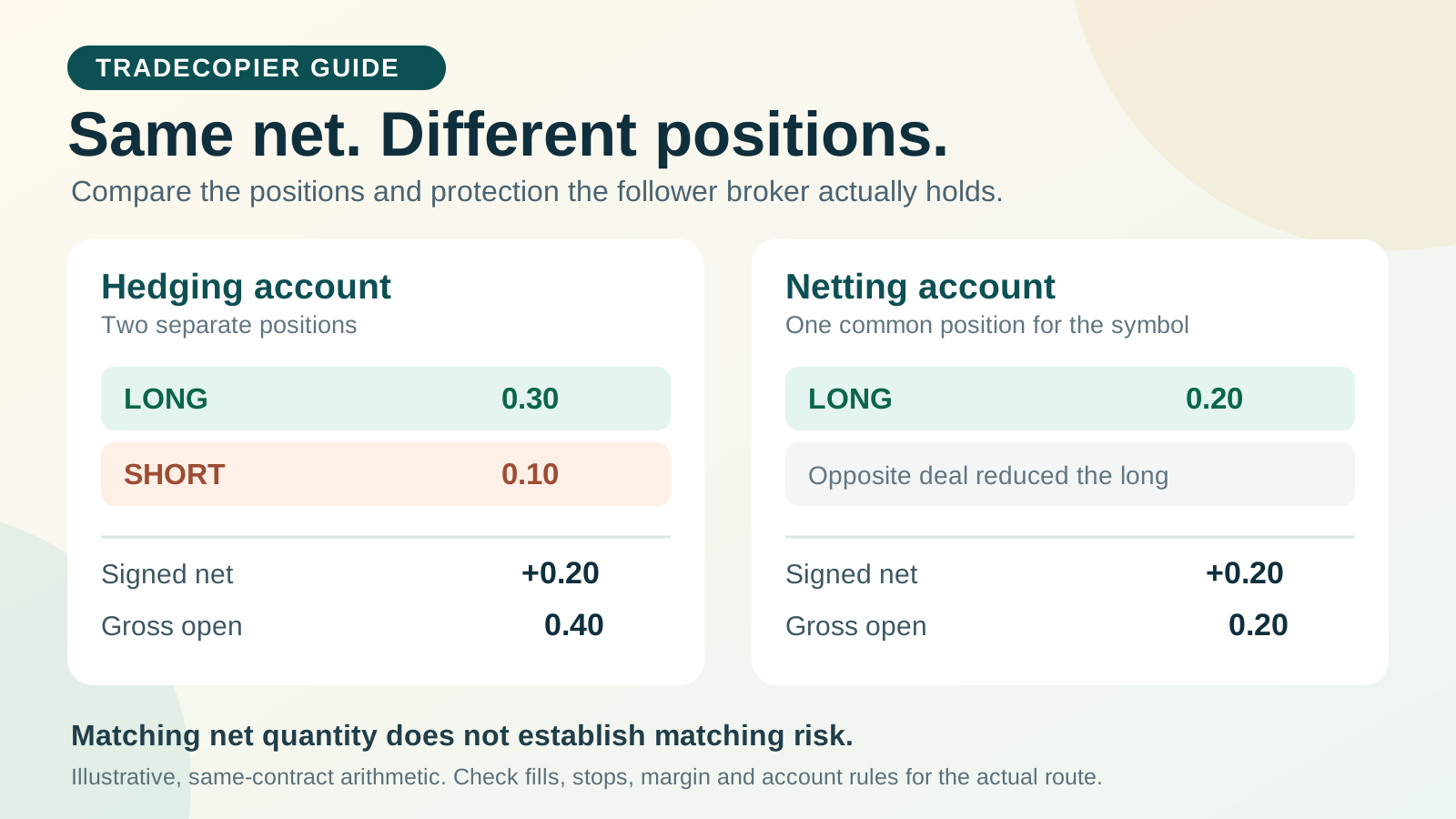
Consider a hypothetical source that fully fills a 0.30-lot buy and then a separate 0.10-lot sell of the same contract. Assume both positions are permitted and no other positions exist. The hedging source can retain both tickets. A netting follower receiving equivalent opposite-side deals would end with one 0.20-lot long position. The signed net quantity matches, but the gross open quantity, position identities, exits, stops, margin treatment and financing may differ.
| Stage | Hedging source state | Netting follower state if both deals fill | What remains to verify |
|---|---|---|---|
| Start | No position | No position | Account mode, symbol and contract equivalence |
| Buy 0.30 | Long 0.30 ticket A | Long 0.30 position | Filled volume and protection levels |
| Separate sell 0.10 | Long 0.30 A plus short 0.10 B | Long 0.20 common position | Was this a new hedge or an intended partial close? |
| Compare | Net +0.20; gross 0.40 | Net +0.20; gross 0.20 | Stops, margin, costs and later close instructions |
The numbers cannot be reused across unlike contracts or sizing rules. “Same net lot” does not prove equal money exposure, loss at stop or account risk. A follower that omits the second action entirely would also show long 0.30; inspect the actual order and deal history before attributing a mismatch to account mode.
Netting source to hedging follower: distinguish reversal from a second entry
For the reverse direction, suppose a netting source has fully filled long 0.20 and then a sell 0.35 fills. MT5's netting rule leaves a 0.15-lot short after closing the old long quantity and reversing the remainder. On a hedging follower, simply opening a fresh short 0.35 alongside the long 0.20 produces the same signed net quantity but two positions and 0.55 gross quantity. A hypothetical close-then-open translation would first close the selected long 0.20 and then open short 0.15, subject to route support, broker permissions and fills.
| Step | Netting source | Hedging follower if sell is only a new entry | Hedging follower if close then open completes |
|---|---|---|---|
| Before | Long 0.20 | Long 0.20 | Long 0.20 |
| Sell 0.35 event | Long closes and short 0.15 remains | Long 0.20 plus short 0.35 | Long 0.20 selected and closed; short 0.15 opened |
| After full fills | Net −0.15; gross 0.15 | Net −0.15; gross 0.55 | Net −0.15; gross 0.15 |
Neither sequence establishes what TradeCopier actually sends. A partial fill, rejection or unsupported reversal can leave another result. Record the intended lifecycle before testing; then compare the source event, copier decision, destination requests, broker deals, positions and stops. Do not equate a copied “sell” label with a completed reversal.
Close by is a specific hedging action, not general netting
On an MT5 hedging account with two permitted opposite positions in the same symbol, the platform's Close By operation can pair them. A fictional long 0.30 and short 0.10 leaves long 0.20 if the operation completes; equal quantities would close both. The request identifies the two positions. It is not interchangeable with placing a fresh sell on a netting account, and a copier should not be assumed to forward a Close By command across different account modes.
Availability depends on the account and instrument. The MQL5 symbol property for Close By identifies whether the operation is allowed for the symbol. MetaTrader 4 also documents closing by an opposite position, but this does not make an MT4 Close By instruction equivalent to an MT5 netting reversal. Check both position identifiers, the broker result, residual exposure and applicable charges in the actual account.
Account restrictions: classify the rejection before changing the trade
A hedging position-accounting mode is not unconditional permission to hold opposite positions. MT5's trade-server return codes include 10046 for prohibited opposite positions and 10045 for a FIFO closing violation. Those codes are evidence of a server rejection, not instructions to bypass a broker, prop-firm or jurisdictional rule. Preserve the native response and current positions. Confirm the permitted sequence with the account provider and the current connector documentation; do not switch account mode, reverse an instruction or retry a rejected order merely to evade the restriction.
| Observation | Inspect next | Decision while unresolved |
|---|---|---|
| Opposite position rejected | Account hedge permission, native code, symbol and existing exposure | Hold the route; ask the broker which action is permitted |
| Selected close rejected | FIFO flag, oldest open position and close request target | Do not force a different ticket without an approved rule |
| Close By unavailable | Account mode, symbol's Close By permission and route support | Do not assume separate closes are equivalent |
| No response or partial fill | Order and deal history, residual position and protection | Reconcile broker state before any retry |
Stops and tickets need their own reconciliation
Position translation can change protection. MT5's documented netting rules say increasing or reversing a position can use the latest order's stop-loss and take-profit values, including removal when zero is specified. A partial close keeps the existing levels; one-click operations have an exception. These are MT5 platform rules, not a promise about the fields a particular copier sends. On a hedging account, separate positions can have separate protections. Inspect the current broker-side position after every material action, especially a reversal or a partly completed close.
A position count or one ticket number is not a safe reconciliation key across accounts. Use account and server aliases, symbol and contract, side, filled quantity, relevant order/deal history, position identifiers, current SL/TP and event times. Compare signed and gross exposure separately. If protection or exposure is unresolved, treat the route as unverified. The stop-protection investigation gives a separate incident ledger for missing or rejected SL/TP changes.
Make a small, reversible route test
Use a permitted demo or simulation where available, with a deliberately small quantity. Confirm the exact source-to-follower direction and connection method in the current product, then test only actions supported by both accounts. The MT5 setup guide covers a wider first-run sequence; this record focuses on the account-mode result. A demo result does not certify the next live fill or broker policy.
| Field | Value or dated observation |
|---|---|
| Source and follower aliases, broker/server, platform and version | ________ |
| Direction and supported connector action | ________ |
| Account mode, opposite-position permission and FIFO rule | ________ |
| Source and follower symbol, contract size and volume step | ________ |
| Starting gross and signed net exposure; stops | ________ |
| Intended open, partial close, reversal or Close By action | ________ |
| Copier event and destination request IDs, if exposed | ________ |
| Broker response, orders, every deal/fill and native error | ________ |
| Ending position identities, gross/net exposure and actual SL/TP | ________ |
| Mismatch, responsible reviewer and retest decision | ________ |
Keep credentials and personal account numbers out of a shared record. If the requested result and broker position differ, use the general exception guide to classify where the action stopped. Do not describe the route as validated until each required action has a dated result from the exact accounts and connector.
Quick answers
Frequently Asked Questions
Find answers to the most common questions about this topic.
What is the difference between a netting and hedging account in trade copying?
A netting account has one common position per symbol; opposite filled deals can reduce, close or reverse it. A hedging account can hold separate same-symbol positions, including opposite positions when the broker permits them. Compare the resulting broker positions, not just the number of copied orders.
Can a hedging source copy to a netting follower without changing risk?
Equal signed net quantity does not prove equivalent gross exposure, margin, stop-loss settings, financing or later close behavior. Confirm the exact copier route and test its orders, deals and final follower position under the actual account rules.
How should a netting reversal be handled on a hedging follower?
The intended follower result must be defined for the route. A new opposite entry can leave two hedged positions, while closing the selected old position and opening the residual direction can produce different gross exposure. Do not assume TradeCopier uses either sequence without a controlled route test and broker history.
What does Close By do on an MT5 hedging account?
Close By pairs two permitted opposite positions of the same symbol. If their volumes differ, a position with the difference remains in the larger side’s direction. Availability depends on the account, symbol and supported action; it is not the same as a netting reversal.
Why did the broker reject an opposite position or a selected close?
Inspect the native server response and account rules. MT5 return code 10046 identifies prohibited opposite positions; 10045 identifies a FIFO close violation. Preserve the current positions and confirm the permitted action with the account provider rather than bypassing the rule.
Does a matched net position prove that stop-loss and take-profit copied correctly?
No. Reversals and increases can change MT5 net-position protection, and separate hedging positions may carry separate levels. Inspect the current follower broker position, actual SL/TP and linked order/deal history after each material action.
Does TradeCopier guarantee netting-to-hedging translation on every connector?
No. The inspected self-service app offers MT5, TradeLocker and cTrader account choices, but those choices do not document every direction, account mode or order-action mapping. The MT4 Close By reference describes platform behavior, not proof that a particular TradeCopier MT4 route translates the action as expected. Confirm the exact source-to-follower route in the current product or with support, then test the actions and restrictions you require.









