01
Who owns every account?
Some programs distinguish copying between your own accounts from signals, team trading, account management, or copying between different owners.
Prop Firm Trade Copier
TradeCopier can route instructions between supported accounts and apply account-level settings. Whether a specific prop account may use a copier depends on the firm, program, account stage, ownership rules, platform, and permitted connection method.
Product controls can reduce operational mistakes. They do not guarantee rule compliance, challenge success, a payout, or protection from losses.
Is this exact workflow permitted?
Is the account path supported?
Do events and account states reconcile?
Are rules, records, and settings still current?
Keep a dated copy of the applicable rule, any provider support answer, the tested configuration, and the destination result.
Direct answer
A working account connection proves only that a technical path can operate. It does not prove that the provider allows that path for your exact account. Complete both checks before live copying.
01
Some programs distinguish copying between your own accounts from signals, team trading, account management, or copying between different owners.
02
A challenge, evaluation, simulated funded account, express account, and live funded account can have different rules at the same provider.
03
Permission for an integrated copier, local EA, VPS workflow, or third-party cloud service is not interchangeable. Verify the exact route you plan to use.
Decision ownership
Use a written record for each decision. Provider rules can change, and two products from the same provider can have different copier policies.
| Question | Who decides | Evidence to keep |
|---|---|---|
| Can the account and platform route connect? | TradeCopier support and the current product matrix | Exact platform, broker or server, account type, and direction |
| May a copier be used on this account? | The prop firm’s current official rules | Program, stage, owner, source account, destination account, and copier type |
| Will a protection request execute before a loss limit? | No party can guarantee that outcome | Trigger record, broker response, fills, position, gaps, slippage, and connection state |
| Does one successful test prove continuing permission? | No | Recheck after a rule, account, platform, broker, or configuration change |
Preflight
The checklist creates a dated trail from permission through technical testing. It is designed for a trader’s own supported accounts; it is not approval for signals, account management, or copying between different owners.
Record an alias for each source and follower, the owner, provider, program, account stage, platform, broker or server, and account mode.
Check the provider’s own terms and help center for copying, automation, external tools, ownership, account limits, news, holding, IP, and location rules.
If the rule is unclear, describe the exact source, destination, ownership, stage, platform, and cloud or local connection method. Save the dated answer.
Verify the specific TradeCopier route and requirements. A platform name alone does not establish that every broker, server, or account type is supported.
Test opening, modification, partial and full close, pending orders, rejection handling, reconnect behavior, mapping, and sizing where permitted.
Compare copier activity with destination orders, deals, fills, and positions. Repeat the rule check whenever the account or setup changes.
Product scope
TradeCopier provides configuration and evidence features for supported workflows. Every control still depends on the destination connection, broker response, market state, and the settings you choose.
Set follower sizing and eligible copying behavior separately. Confirm the resulting quantity, symbol, and account mode before live use.
Review configuration controlsConfigure a threshold that can pause copying or request other supported action. A trigger is not a guaranteed fill or maximum realized loss.
Review equity protectionApply supported pause windows around selected events when that matches your verified account rules. Provider rules and market conditions can change.
Review news controlsUse copier records as one evidence source, then reconcile them with the destination account. A submitted or accepted request is not always a completed fill.
Review activity logsBoundaries
These limits belong in the decision because a copied instruction can pass through several systems before it becomes a verified destination position.
Rule register · version 1 · checked September 24, 2026
This dated, manually maintained register records what three providers' official pages said when checked. It is not a compatibility list, account-specific permission, or automatic rule monitor. Source pages can change before the next editorial review.
| Provider and stage | Dated source observation | Official source | TradeCopier route / your permission |
|---|---|---|---|
| FTMO FuturesEvaluation and Sim-Funded | Its futures rule distinguishes prohibited third-party decisions from copying across your own accounts. Every account must still comply with its rules independently. | Read FTMO Futures rules | Not verified for a specific account or route. Check with the provider and test the exact connection separately. |
| FundedNextOwn Challenge accounts | Its article describes conditional copying between the same trader’s Challenge accounts, including a combined capital limit and one designated master. External cloud-based copiers are prohibited. | Review the FundedNext rule record | Not verified for a specific account or route. Check with the provider and test the exact connection separately. |
| FundedNextFundedNext Account | The same article prohibits copying between a FundedNext Account and another FundedNext or Challenge account, even under the same owner. | Review the FundedNext rule record | Not verified for a specific account or route. Check with the provider and test the exact connection separately. |
| TopstepXTrading Combine and Express Funded | Its help center describes TopstepX’s integrated copier for these stages. That statement does not approve a separate third-party copier or verify a TradeCopier connection. | Read TopstepX rules | Not verified for a specific account or route. Check with the provider and test the exact connection separately. |
| TopstepXLive Funded | The same TopstepX article says its integrated copier is unavailable for Live Funded accounts. | Read TopstepX rules | Not verified for a specific account or route. Check with the provider and test the exact connection separately. |
Initial baseline checked September 24, 2026; no previous version was compared, so no change is claimed. Editorial owner: TradeCopier Editorial Team. Next manual review due October 24, 2026; recheck the provider source and obtain a dated answer before using any rule. The source pages did not provide an exact revision date for this register. Download the version-one review register to record a later change and the exact account decision.
Worked rule example · checked September 24, 2026
A copier does not combine profit targets or loss limits across accounts. One firm's consistency ratio divides its largest eligible trading day by the relevant cumulative profit; the denominator, threshold, trading-day boundary and reset policy depend on the exact program.
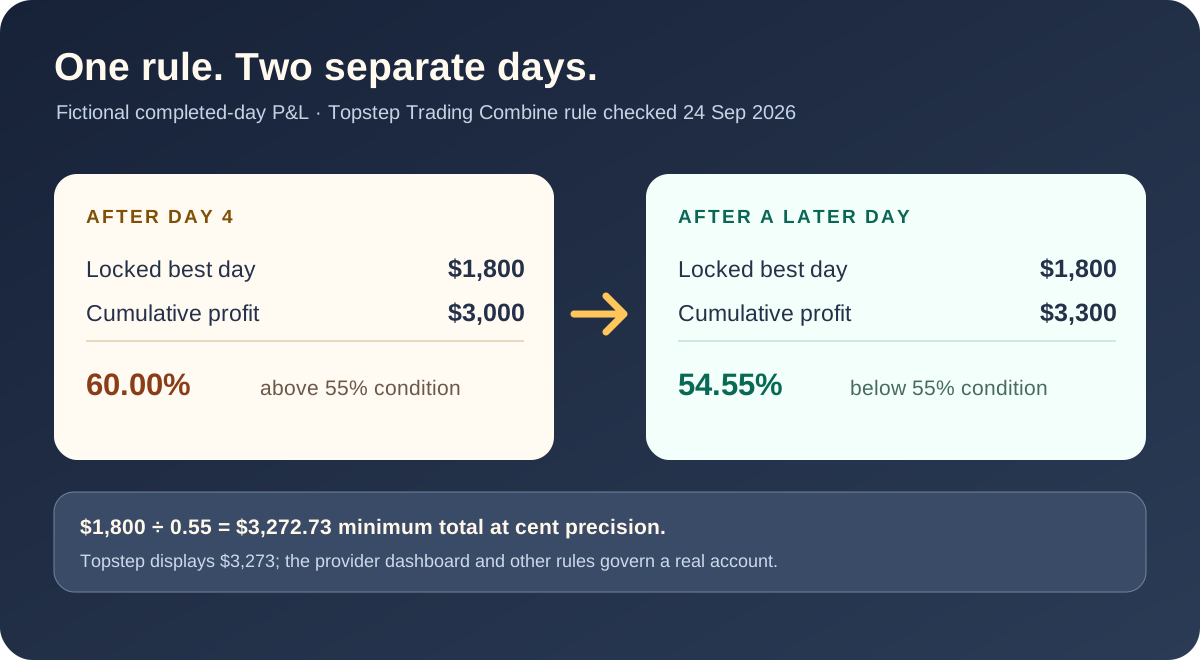
Topstep currently describes a 55% best-day consistency target. A $50K Trading Combine has a $3,000 starting profit target. If the best day exceeds the threshold, the required profit target increases. Losses do not erase the locked best day.
Topstep describes a different 40% objective for this payout path, using the largest single-day net profit divided by total net profit. The calculation resets after a payout request and has other day-count requirements. Do not apply the Trading Combine example to this program.
These program descriptions are from Topstep’s consistency guide, checked September 24, 2026. Reopen the current official source before using a threshold; its help article had been updated within the preceding week.
Assume completed trading days and a fictional $50K Trading Combine. The locked best day remains $1,800 after Day 1. By Day 4 total profit reaches $3,000, but $1,800 ÷ $3,000 = 60%, above the 55% condition. The arithmetic requires at least $1,800 ÷ 0.55 = $3,272.73 total profit at cent precision, provided the best day does not increase. Topstep displays the adjusted target as $3,273 in its published example; use the current provider dashboard for a real account. A later, separate $300 day takes total profit to $3,300 and the unrounded ratio below 55%.
| Completed day | Day net profit | Cumulative profit | Locked best day | Best day / total |
|---|---|---|---|---|
| Day 1 | +$1,800 | $1,800 | $1,800 | 100.00% |
| Day 2 | −$300 | $1,500 | $1,800 | 120.00% |
| Day 3 | +$1,000 | $2,500 | $1,800 | 72.00% |
| Day 4 | +$500 | $3,000 | $1,800 | 60.00% |
| Day 5, later | +$300 | $3,300 | $1,800 | 54.55% |
Percentages in the table are rounded for display; the rule comparison uses the unrounded ratio. This checks one mathematical condition only. It does not establish that a real account passed, qualifies for a payout, may use TradeCopier, or met the provider’s other rules. Each follower account requires its own ledger and current dashboard check.
Download the fictional day-by-day CSV to recompute the ratio. It contains no customer account or trading result.
Evidence
A source event, copier request, broker acknowledgement, fill, and resulting position are different records. Use the available identifiers and timestamps to connect them without assuming that submission equals execution.
01
Instrument, side, action, requested size, order type, and protection settings.
02
Eligibility, mapping, sizing, configuration version, submission, and error records.
03
Broker order response, every linked fill or deal, and the resulting position.
04
Rejected, partial, unresolved, reconciled, or escalated with redacted evidence.
If an outcome is uncertain, do not blindly repeat the instruction. Check the destination account and follow the current supported recovery procedure.
Questions and answers
There is no universal rule. Permission can depend on the provider, program, account stage, account ownership, source and destination, platform, and whether the copier is integrated, local, VPS-based, or a third-party cloud service. Check the current first-party rule for your exact workflow.
No. Technical support means the account route can be evaluated for connection. Only the prop firm’s current rules or a dated written answer from that firm can establish permission for a specific account and connection method.
Only when the current rules for every affected account allow the exact workflow. Some firms permit certain own-account copying, while others restrict the program stage, account combination, allocation, platform, or external copier method.
Calculate the provider’s current rule separately for every affected account. Some programs compare the largest eligible trading day with cumulative profit, but thresholds, trading-day boundaries, payout windows and reset policies differ. A copied instruction or one passing ratio does not prove account approval or payout eligibility.
No. It is a dated manual editorial record, not a live permission or compatibility feed. Open the linked official rule and confirm the exact program, stage, account ownership and copier method before connecting an account.
No. Permission for an Expert Advisor or automated strategy does not automatically permit a third-party cloud copier. Verify the named connection method in the provider’s current rules.
No. A configured threshold can trigger a supported pause or close request, but gaps, slippage, rejections, partial fills, disconnections, and calculation differences can change the realized result. Keep a buffer based on the provider’s actual rule and reconcile the destination account.
Treat the accounts as potentially out of sync. Review the copier event, broker response, linked fills or deals, and the resulting position. Do not blindly repeat an instruction whose outcome is uncertain.
If the published rule does not clearly cover your exact source, destination, ownership, account stage, platform, and connection method, ask the provider a precise question and retain its dated answer.
No. TradeCopier does not claim to conceal activity, evade review, guarantee compliance, pass a challenge, secure a payout, or prevent losses. Use it only within current provider rules.
Related decisions
Check the current platform directory, then confirm the exact account route with support.
Review supported platforms →Understand the product workflow before treating a platform combination as supported.
Review cross-platform copying →The permanent Free plan includes one trading group and three total accounts; paid plans add capacity.
Compare current plans →Connect only after checking both technical support and the provider’s current permission.
Read the setup path →Connect after verification
The Free plan includes one trading group and three total connected accounts. Confirm your exact route and prop-firm permission before connecting a live account.

Connect supported accounts with configurable sizing, risk controls, activity logs, and alerts.