Stop-Loss and Take-Profit Sync:
Diagnose Missing Protection
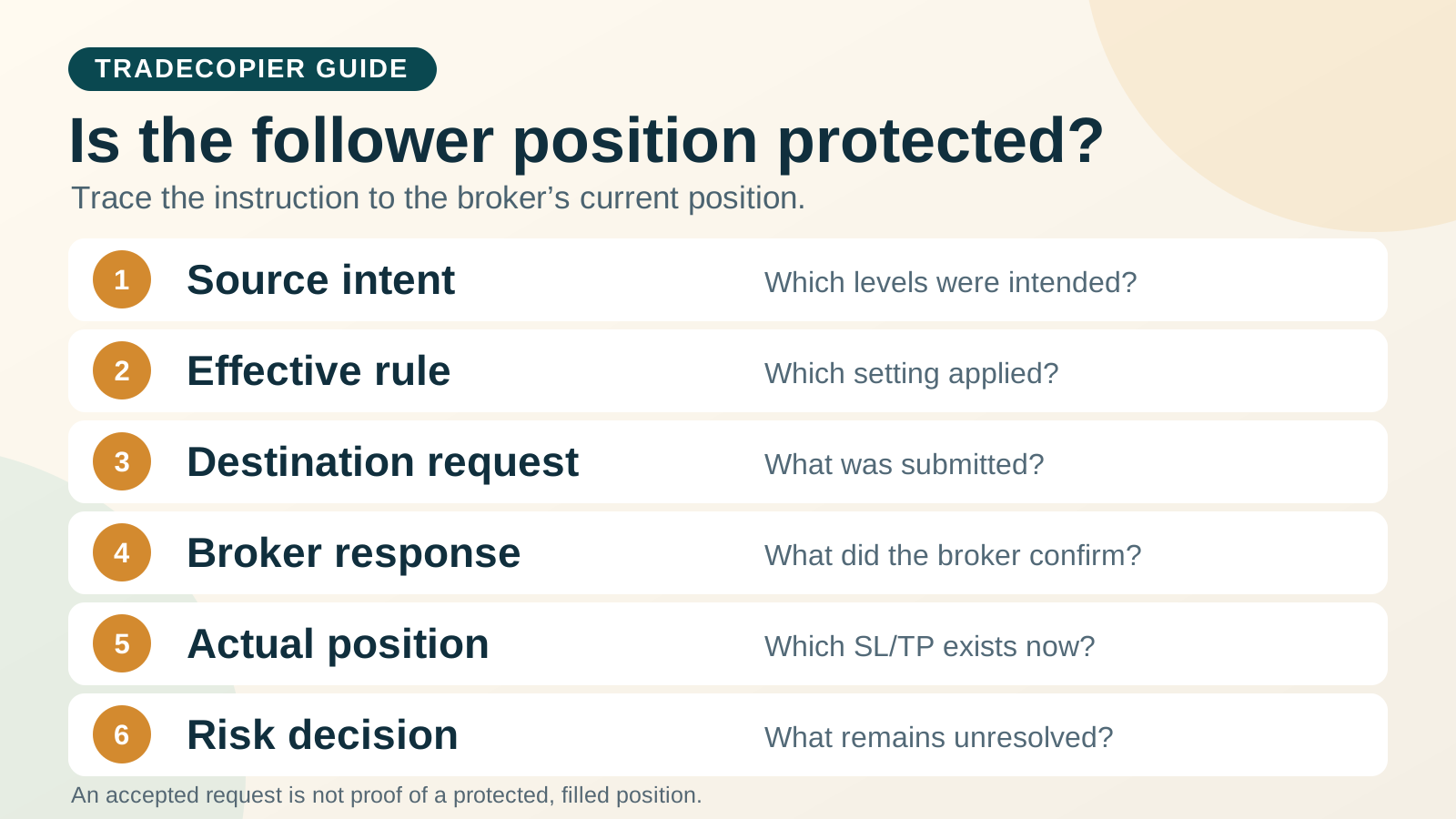
If a copied stop-loss or take-profit is missing, trace the intended source level, the rule selected for that follower, the submitted destination request, the broker response and the protection currently recorded on the destination position. A “No SL/TP” label does not identify which stage failed. It can describe a deliberate no-protection setting, an entry that never filled, a rejected protection change, an unresolved response or a position whose levels later changed.
Publisher disclosure: TradeCopier publishes this guide about its own product. Its public configuration overview, checked September 23, 2026, describes stop-loss and take-profit modification, global defaults and per-follower overrides. It does not document a universal precedence rule for source protection versus every global and follower setting, or guarantee the same lifecycle on every connector. The MT4, MT5 and cTrader references below explain platform concepts, not measured TradeCopier outcomes.
First identify what “No SL/TP” means on this event
Start with the exact source event and one follower. Was it a new entry, a change to an open position, a pending-order change, a partial close or a reversal? Preserve the native message instead of converting every missing field into a generic “sync failed” diagnosis.
| Observation | Evidence that separates it | Open question |
|---|---|---|
| No protection was intended | Source level and saved route policy both omit it | Was that omission deliberate and permitted by the account's risk plan? |
| Entry was rejected or never filled | No linked destination deal or open position | Is there any pending order or partial execution to reconcile? |
| Position filled, protection change rejected | Open position plus native modification rejection | Does an older stop or target remain on the position? |
| Request accepted but state not yet confirmed | Submission acknowledgement without a fresh position snapshot | Did the broker apply, reject or defer the modification? |
| Response missing | Request or event logged but no matchable broker outcome | What do current orders, deals and position fields show? |
| Protection was later replaced or removed | Position history shows a later order, reversal or zero-level update | Which event changed the final position's protection? |
The general trade copier troubleshooting guide covers connector and missing-order triage. Here the decisive question is narrower: what protection exists on the actual follower exposure now? An alert or a source chart is not a substitute for that broker-side check.
Use a six-stage protection-state ledger
Record intended, submitted and observed levels separately. A numeric price without its exact symbol, side, quantity, account mode, timestamp and rule version is hard to interpret. The blank ledger below is an editorial template; it is not a TradeCopier export or an automatic risk control.
| Stage | Record for this source event and follower | Decision question |
|---|---|---|
| 1. Source intent | Source order/position ID, action and intended SL/TP before and after the event | Was protection present, changed or intentionally omitted? |
| 2. Effective rule | Global setting, follower override, connector, configuration version and selected behavior | Which rule actually applied? Mark precedence UNKNOWN if undocumented. |
| 3. Destination request | Mapped symbol, side, requested level, order/modification type, time and correlation ID | Was a new entry, pending order or separate protection amendment sent? |
| 4. Broker response | Exact native code, message, order ID and any linked deal/fill IDs | Was it rejected, accepted, partly executed or unresolved? |
| 5. Actual protection | Fresh destination position and pending-order snapshot, including current SL and TP fields | Is the position open with intended, older, different or no protection? |
| 6. Risk decision | Evidence gap, responsible person, policy-based action and next check time | Should the affected route be held while exposure is assessed? |
MT5's OrderSend reference says successful request submission does not by itself establish execution. cTrader's API messages likewise separate order detail, linked deals, current-position reconciliation and a request to amend position SL/TP. These are reasons to check the final account state rather than infer it from a copier acknowledgement.
Test source, global and follower rules without guessing precedence
The published TradeCopier configuration page describes global defaults and per-account overrides and says source SL/TP modifications can be propagated. It does not spell out which protection value wins when a source change, global default and follower-specific setting conflict for every route. Use the following hypothetical test cases in a permitted controlled environment, document the expected behavior before the event, and compare it with the saved rule, copier request and broker result. Do not count a case as passed merely because the source chart changed.
| Source event | Proposed route condition | Observation needed |
|---|---|---|
| New entry with source SL and TP | No explicit follower override | Are the destination levels requested and actually present after execution? |
| New entry with no source protection | A proposed global or follower default, if exposed by this route | Is omission retained or a documented default applied? Never assume either. |
| Source SL changes after entry | Follower-specific setting differs from global setting | Which value is sent, and what does the destination position show afterward? |
| Source removes an SL or TP | Follower previously has protection | Does the route preserve, replace or remove the existing level? |
| Source partial close or reversal | Follower has an existing position and protection | What position remains, and which SL/TP fields survive? |
Account mode matters. MetaTrader 5 trading principles explain that, on a netting account, adding to or reversing a position can replace its SL/TP with the latest order's values, and zero values can remove them. That is MT5 account behavior, not proof of TradeCopier's rule order. Compare the final follower position after the full event sequence.
Read the broker's stop and freeze rules for the exact symbol
A protection request can fail because the destination symbol, order type, price relationship, stop distance, freeze level or current market state differs from the source. MT5 symbol properties expose stop and freeze levels and allowed order modes; the values belong to the specific broker symbol and server. MT4's stop-level reference warns that a reported zero may still coexist with a dynamic server restriction. Never substitute a universal five- or fifteen-pip distance for the active account specification.
MT5 return codes distinguish invalid stops, a frozen order/position, accepted placement, completed execution and partial execution. Preserve the exact code and time. cTrader's model exposes symbol-specific stop and take-profit distances and whether units are points or a percentage; it also distinguishes protection-too-close and other native errors. Translate units only after identifying the actual platform, instrument and account.
On cTrader Open API, an absolute stop-loss/take-profit field is not supported for a new market order in the same way as a relative protection field; an existing position uses a separate amendment message. This documented API distinction is a diagnostic question, not a claim that TradeCopier uses that API route. A copied entry, a linked deal and a later protection change need their own evidence.
Separate rejection, partial execution and unknown outcome
A confirmed entry rejection is not an unprotected open position. A filled entry with a rejected stop modification may be an open position with an older stop or with no stop. A missing modification response is neither a rejection nor proof of application. Check the destination's current orders, linked deals, open position and protection fields before any new request. The separate partial-fill guide explains why an order can have more than one deal.
Consider a fictional follower whose position has stop S1. At 14:00Z, the source requests a move to S2. If the broker explicitly rejects the modification, do not write “no SL/TP” until you inspect the position: S1 may remain, or another event may have changed it. If the response never arrives, mark the amendment unresolved and inspect the broker record before repeating it. S1, S2 and the time are invented labels, not a TradeCopier test, broker quote or recommended level.
Do not automatically widen a rejected stop, open a replacement position, switch brokers or retry an uncertain request. Those actions can alter intended risk or create duplicate exposure. If the position is open without the protection required by the trader's plan, escalate and follow that plan's pre-agreed hold, reduce or close decision through the supported broker workflow. This article does not direct a universal order action for every account.
Copy a blank, redacted protection incident record
Keep this record with the source event and each affected follower. Enter UNKNOWN when a state cannot be verified; do not treat a blank field as zero risk or a confirmed rejection. Mask account identifiers and remove passwords, tokens and personal information before sending it to support.
| Field | Dated evidence or decision |
|---|---|
| UTC time, timezone source, reviewer and masked source/follower accounts | ________ |
| Platform/connector version, broker server, account mode, exact source and mapped symbols | ________ |
| Source event/order ID, action, position before event, intended SL and TP | ________ |
| Global and follower rules, selected value, config version and precedence evidence | ________ |
| Destination request/correlation ID, order or amendment type, submitted levels and time | ________ |
| Native broker code/message, order and linked deal IDs, executed quantity | ________ |
| Fresh destination position, pending orders, actual SL/TP and snapshot time | ________ |
| Unresolved evidence, policy-based action, decision owner and next check | ________ |
Confirm the final state and retest the affected route
When the broker state is established, record whether the source intent and actual follower protection match, what caused any difference and which settings changed. Retest the affected entry and modification lifecycle on the same route and instrument in an appropriate controlled environment. The dedicated news exception guide covers freeze levels and off-quotes during volatile releases; this page focuses on the protection state after an event.
An ordinary stop-loss is an instruction, not a guaranteed execution price or fixed maximum loss. cTrader's order guide describes ordinary stop-loss execution at the best available market price after triggering. A separately offered guaranteed-stop product depends on the broker, symbol and account terms; confirm whether the exact connection route supports it before relying on it. Confirm the position and protection directly instead of treating a configured source level or copier log as a guarantee.
Quick answers
Frequently Asked Questions
Find answers to the most common questions about this topic.
Why is my follower missing a stop-loss when the source has one?
Check the source event and intended level, the effective global and follower rule, the submitted destination request, the native broker response and the SL field on the current follower position. A source chart alone does not show which stage omitted or rejected protection.
What does “No SL/TP” mean in a trade copier log?
It is an observation, not a universal platform error. It could reflect deliberate omission, a rejected or unfilled entry, a rejected modification, an unresolved response, or a later position change. Use the exact native message and broker account state to identify the case.
What if the broker rejects an SL/TP modification?
Preserve the native code and requested levels, then inspect the open destination position. An earlier stop or target may remain, or the position may have no protection. Review symbol-specific stop and freeze rules and follow your pre-agreed risk decision; do not silently widen the level.
Does a timeout mean the stop was not placed?
No missing response proves that. Treat an unmatched response as unresolved, inspect current broker orders, deals and position protection, and avoid repeating a request until its outcome is known or the supported route policy safely handles it.
Do source, global or follower SL/TP settings take precedence?
TradeCopier describes global defaults and per-follower overrides, but its public page does not define a universal protection-specific precedence rule for every connector. Record the exact saved settings and test a controlled conflict on the intended route before relying on an outcome.
Can I fix an invalid-stop rejection by automatically widening the stop?
Changing a stop level changes intended risk. Verify the exact broker symbol, units, minimum stop distance and freeze rule, then make any new order or protection decision under the trader’s authorized policy. A generic automatic widening rule is not established here.
Does a stop-loss guarantee my maximum loss?
An ordinary stop-loss does not. Its trigger and final execution prices can differ under market conditions. A separately offered guaranteed-stop product depends on the broker, symbol, account and supported route; inspect the actual broker position and order type rather than assuming a displayed stop is guaranteed.