Glossary · Last updated: 9 November 2026 · By TradeCopier Editorial Team
Flatten Position: What Closing All Trades Means
Flatten position means closing all open positions in an account, and cancelling working orders where the platform flatten function does that. NinjaTrader 7 help describes Flatten Everything this way across connected accounts and says the function is not guaranteed. With a trade copier, each follower account holds its own positions, so each one needs checking.
Traders use flatten to mean a fast exit: every open position in an account is closed in one action. The exact effect depends on the platform and on what the account holds, so the label alone does not tell you the result.
The term matters more when a trade copier is involved. The source account and each follower account are separate accounts with separate positions and separate broker responses. A flatten on the source starts a chain of events, and each follower then has its own outcome.
Key takeaways
- Flatten means closing all open positions in an account, and often cancelling working orders too. Check which one your platform does.
- NinjaTrader describes its flatten function as not guaranteed. Treat any flatten as an action to verify, not a guaranteed exit.
- A trade copier keeps a separate position in each follower account. One close request does not prove that every follower is flat.
- TradeCopier describes a manual Emergency Close All and optional close rules. Confirm which of these applies to your route before you rely on them.
- After any close-all, reconcile each broker account against the source and the copier activity log.
What a flatten position means
In practice a flatten has two parts. The first is closing open positions. The second, where the platform supports it, is cancelling working orders such as pending limit or stop orders that have not filled. Whether one control does both depends on the platform, so read the menu label and the help text before you use it in a live account.
The word position is the one to watch. MetaTrader 5 help on general concepts separates orders, deals and positions. It notes that a request which passes the server check still has to be processed, and that a deal can be opened as a result of a market order executing or a pending order triggering. For that reason, check the position list and the deal history after any close-all action, rather than relying on the button alone.
Traders also use flatten loosely to mean reducing exposure in one symbol to zero. A symbol-level flatten and an account-wide flatten have very different reach, especially when several symbols or several accounts are involved. Check the scope before you act.
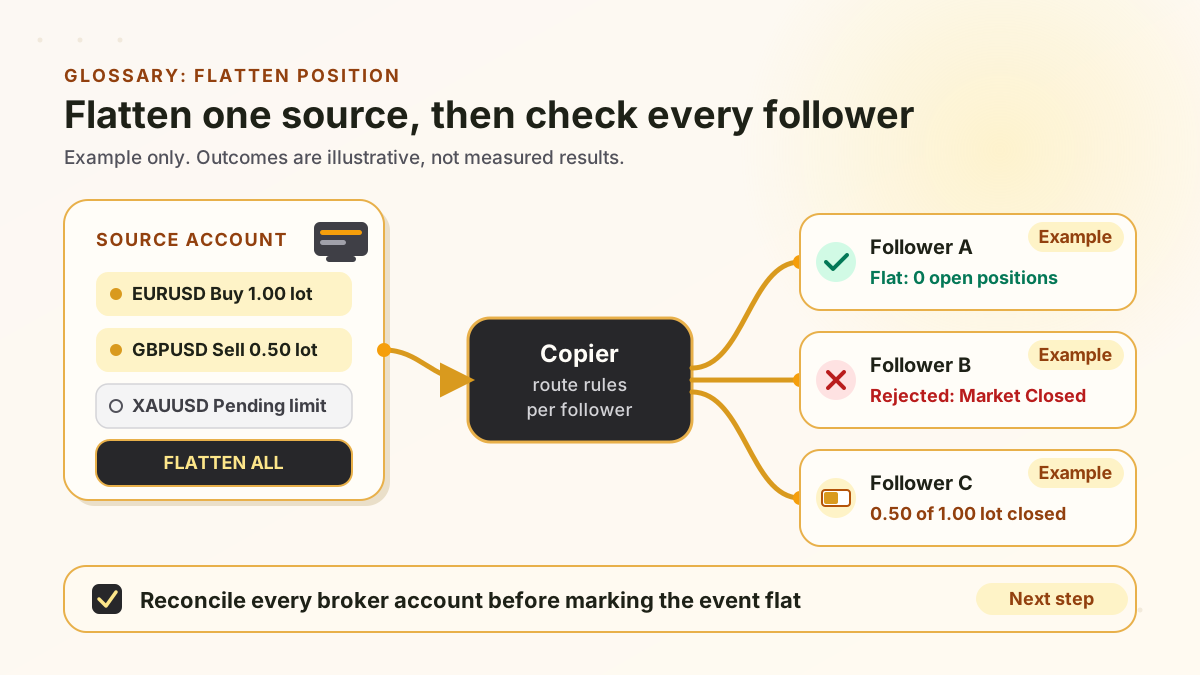
Flatten one source, then check every follower
Example only. The outcomes shown are illustrative, not measured results.
Swipe the diagram sideways to read it at full size.
How platforms word the action
The most direct wording we could fetch comes from the NinjaTrader 7 help page for the File menu. It describes Flatten Everything as flattening all open positions and cancelling all working orders across all connected accounts, and it adds that the function is not guaranteed. In this check we did not find a current NinjaTrader 8 help page for Flatten Everything, so do not assume the NinjaTrader 7 wording applies to every version.
Scope is the second thing to check. An action that reaches across all connected accounts is a very different action from one that closes the positions of a single account or a single instrument. Before any manual flatten, identify which accounts the control touches and whether it also removes pending orders.
TradeCopier controls that act on open positions
This table lists only controls that TradeCopier product pages describe. A control that is not listed here is not a documented flatten feature.
Emergency Close All (equity protection page)
- Trigger
- Manual, on demand
- Action stated on the product page
- Closes open positions across connected accounts, from the server level
- Check before relying on it
- Confirm which accounts and routes are included, then check each broker account.
Floating drawdown monitor (equity protection page)
- Trigger
- Equity falls beyond a configured percentage from the session peak
- Action stated on the product page
- Closes positions and suspends copying
- Check before relying on it
- Test the threshold on your route. Gaps, slippage and rejections can change the outcome.
Hard stop (equity protection FAQ)
- Trigger
- A configured hard-stop condition is reached
- Action stated on the product page
- Sends close-at-market instructions for the applicable open positions and suspends copying
- Check before relying on it
- Confirm which positions count as applicable in your setup.
Close Before News (news filter page)
- Trigger
- Optional per follower account, before a scheduled high-impact event
- Action stated on the product page
- Closes or flattens open follower positions before the event window
- Check before relying on it
- Off by default. Otherwise the news filter pauses new copies only.
Daily loss limit (equity protection page)
- Trigger
- Realized loss reaches the configured threshold for the day
- Action stated on the product page
- Pauses copying. The page lists no close action.
- Check before relying on it
- Check open positions yourself after a pause.
Wording is paraphrased from the pages named in each row. Pages checked 9 November 2026.
What happens to followers after a source flatten
These steps describe what a copier can do and where a flatten can go wrong. They are not a promise that every route behaves this way.
- Step 1
The source closes its positions
The source account closes positions, manually or through a flatten. The copier can only act on the events it receives for that route.
- Step 2
Each follower is handled on its own route
Whether a source close reaches a follower depends on the route settings for that follower. Each follower account is handled separately, with its own mapping and sizing. Lifecycle settings such as Partial Close decide how a partial reduction is handled. TradeCopier states that a proportional partial close can be applied to the follower position.
- Step 3
A close can be rejected or partly filled
A broker can refuse a close, for example when the market is closed or the account lacks margin, or it can fill only part of the close. The activity log example on the activity logs page shows a broker rejection with the reason Market Closed.
- Step 4
The follower can stay exposed
If a follower close fails, that account keeps a position the source no longer holds. Unless a later close succeeds or someone closes the position manually, the account stays exposed.
- Step 5
Reconcile every account
Compare each broker account with the source and the copier log. Mark an account flat only after its own broker records show no open position or pending order.
Reconcile after any close-all
Use this list after a manual or automatic flatten. It covers the source, each follower and the copier record.
- Confirm the source account is flat: no open positions, no pending orders, and no manual trade that appeared during the event.
- For each follower broker account, check open positions and pending orders in the broker terminal, not only in the copier dashboard.
- Open the copier activity log for the event, look for rejected closes and read the broker reason text, then compare each follower's open positions at its broker.
- Decide what to do with each follower that is not flat: retry, close manually, or accept the position under your own rules. The decision stays with you.
- Check whether a news or drawdown pause is still active before copying resumes, so that a new trade is not copied into a changed market.
- Record the time, the accounts checked and the result, and keep the record with your trading journal.
Common misreadings
A flat account is a safe account
A flatten removes open exposure at the moment it runs. It does not cap past losses, change the broker rules or fix a rejected order on another account. Realized losses stay realized.
A paused copier has closed its trades
A pause stops new copies. By default the news filter pauses new copy trades and does not close existing positions. The close setting is optional.
One flat follower means every follower is flat
Each follower is a separate broker account with its own fills, rejections and timing. Check each one.
A threshold guarantees the loss limit
The equity protection FAQ says a threshold is a trigger, not a guaranteed fill price or maximum realized loss. Gaps and slippage can move the result.
Risk note
A flatten is a live trading action. A close at market can fill away from the last price you saw, be partly filled, be rejected, or be delayed by a connection or broker problem. Closing a position can lock in a loss, and a close that fails can leave an exposure you did not intend. Copy trading and trade-closing tools do not remove market risk, and no close control guarantees a result or compliance with a prop firm rule. This page is product education, not personal financial advice. Check your broker and any prop firm rules before you use a close-all.
Related pages
Equity protection
Daily loss limits, drawdown rules and Emergency Close All.
News filter
Pause new copies around scheduled events, with an optional close setting.
Activity logs
Review copy events and the broker reasons given for rejected orders.
Trade settings
Partial close, stop-loss and take-profit sync options per route.
Flatten position questions
Flatten means closing all open positions in an account so that no exposure remains. Whether working orders are also cancelled depends on the platform, so read its help text before you use the control.
It depends on the platform. The NinjaTrader 7 help page describes its Flatten Everything function as cancelling working orders as well as closing positions. Other platforms word the action differently, so check the platform help for your version.
TradeCopier describes Emergency Close All, a manual server-level action that closes open positions across connected accounts. Its equity protection pages also describe drawdown and hard-stop rules that send close instructions. Confirm each control on your route, because the product pages do not describe every outcome.
Not by itself. Follower positions are separate. Whether a source close reaches each follower depends on the route settings, the broker response and the connection status. Check every follower account after the event.
By default no. The news filter pauses new copy trades. An optional Close Before News setting, configured per follower account, can close or flatten open follower positions before the event window.
No. Pausing stops new copies. A flatten or a close instruction acts on positions that are already open. A pause alone does not close an existing position.
Platform wording comes from the NinjaTrader 7 help page and the MetaTrader 5 general concepts page, both checked 9 November 2026. TradeCopier statements come from its own product pages checked on the same date.