reference · Order execution
Price Tick Grids: Why a Correctly Formatted Price Can Still Be Invalid
A price tick grid defines the permitted price increments for an instrument and order context. Decimal formatting alone does not prove that a limit, stop or target price is a valid trading price.

Key points
- Check trade tick size separately from display digits or platform point size.
- Choose rounding direction according to the order's intended constraint.
- Validate tick alignment, distance rules and current trading restrictions as separate checks.
- Keep the platform version and native return code: invalid price, invalid stops and a changed quote are different observations.
- Check order side and the quote used for distance calculations before considering a corrected request.
Scope and assumptions
- The example uses a constant 0.25 increment on a zero-anchored grid. Some instruments or order contexts have other increments or price-band rules; check the applicable specification.
- The diagnostic examples are synthetic, use a constant zero-anchored 0.25 price grid, and are not broker or TradeCopier acceptance tests.
- The pending-order and protective-stop distance examples apply the cited MT4 rules. Exchange and MT5 execution contexts must be checked against their own current specifications.
Display precision and trading precision differ
A price can look tidy on screen and still be invalid. With a permitted increment of 0.25, values such as 5234.00 and 5234.25 fit the grid, while 5234.18 does not. Showing 5234.18 to two decimal places changes its appearance, not its eligibility.
MetaQuotes documents trade tick size separately from point size. CME's tick explanation similarly treats a tick as the instrument's minimum price movement. Use the specification for the exact product rather than inferring a tick from the number of digits in a chart.
Two neighboring prices, two different constraints
Take a hypothetical calculated price of 5234.18 on a zero-anchored grid with tick size 0.25. Dividing by 0.25 gives 20,936.72 ticks. The neighboring valid prices are:
| Choice | Calculation | Price |
|---|---|---|
| Lower grid price | 20,936 × 0.25 | 5234.00 |
| Upper grid price | 20,937 × 0.25 | 5234.25 |
The upper price is closer, but it is 0.07 above the requested value. For a buy limit whose meaning is “pay no more than 5234.18,” moving it up changes the spending constraint. Choosing 5234.00 preserves that ceiling while potentially reducing the chance of execution.
For a sell limit representing a minimum acceptable price, the direction reverses: 5234.25 preserves a minimum of 5234.18. This comparison is about the price boundary. It does not prescribe a universal policy for every stop, target or order-management task.
Recalculate risk when a stop moves
Moving a protective stop to a neighboring tick changes the distance from entry. For a long position, moving the stop lower increases that distance; moving it higher decreases the distance but may violate a minimum-distance rule or change when it triggers. Recompute the planned money exposure after the final accepted price is known.
For a stop-limit order, validate both the trigger and the resulting limit. Rounding only one can alter the relationship between the stages. Keep the original values in the record so a later review can distinguish intentional normalization from an accidental conversion.
Validate against the destination context
Check the current symbol, contract month, tick rule and supported order type. Some rules vary with price bands or order contexts; a constant tick assumption should be confirmed, not silently extended. Implementations should also handle numerical precision so a representable tick is not rejected because of a tiny floating-point residue.
After grid alignment, test distance, freeze or modification restrictions, price bands and session availability separately. A valid grid price does not guarantee order acceptance or execution. The futures specifications guide connects these checks to copied orders, while pips, points and ticks explains the initial unit conversion.
One useful audit test starts with an already valid tick price: normalizing it should leave it unchanged. Test a midpoint and prices on both sides of a boundary as well, with the expected direction documented for each order type.
Invalid price errors: start with the actual response
An invalid-price message is a reason to inspect the request, not a reason to keep resending it. Save the exact destination symbol, operation, requested prices, quote snapshot and native return code. A copied source price may meet the source instrument's rules while failing the destination's tick or order rules. The checks below are an educational diagnostic sequence; they do not describe tested TradeCopier retry behavior.
In MT4 OrderSend, error 129 identifies an invalid requested price, including an unnormalized price or one absent from the price stream. Error 130 concerns invalid stops or pending-order placement. A fully outdated requested market price can produce 138, a requote. Treating every one of these as a decimal-format problem loses useful evidence.
In MT5, read the trade result's retcode. Its native return codes distinguish 10015 (invalid price), 10016 (invalid stops), 10020 (price changed), 10021 (no quotes), 10004 (requote) and 10029 (frozen). Invalid volume is 10014 and belongs to a separate quantity check. These numbers identify response categories, not interchangeable MT4 error numbers or a diagnosis of the underlying cause.
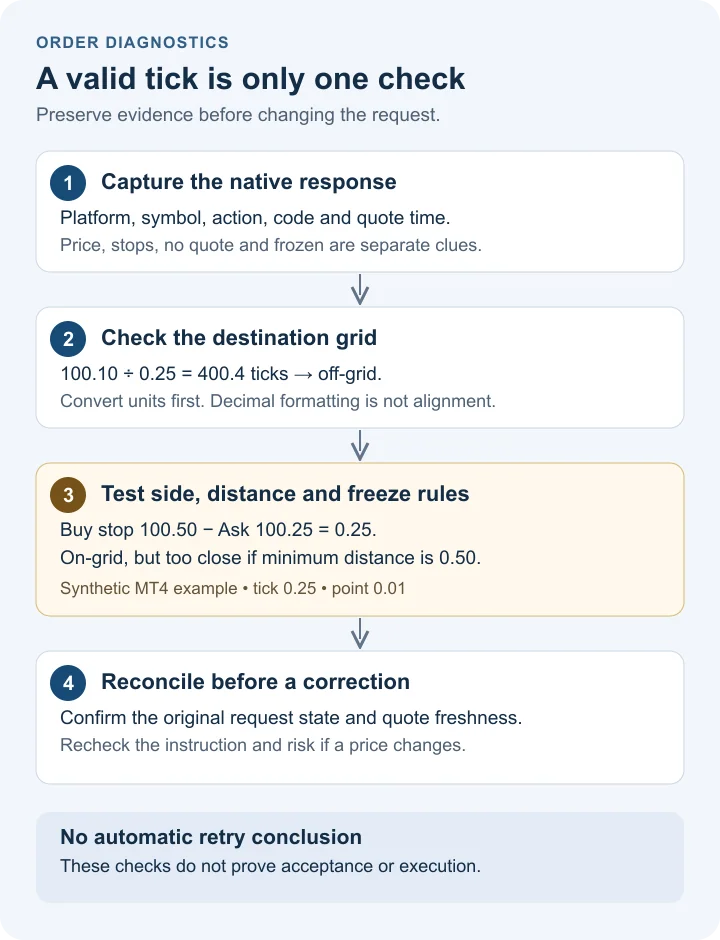
Use the destination units, then test the grid
For a constant tick of 0.25, a price of 100.10 represents 400.4 ticks and is off-grid; 100.25 represents 401 ticks. Both display two decimals. Use an exact decimal or integer-tick representation for the documented increment, rather than a broad floating-point tolerance that admits a genuinely invalid price. A nonzero grid anchor or variable price bands require a different calculation.
Unit labels matter across APIs. The MT4 symbol identifiers document MODE_TICKSIZE in points, whereas MT5 SYMBOL_TRADE_TICK_SIZE is a price increment. If an MT4 specification reports 25 points per tick and point size 0.01, the price increment is 25 × 0.01 = 0.25. Do not multiply an already price-denominated MT5 tick size by point size again. Minimum stop and freeze distances are also expressed in points; record both the raw field and its converted price distance.
Choose the reference side before measuring distance
The MT4 order restrictions place a buy limit below Ask, a buy stop above Ask, a sell limit above Bid and a sell stop below Bid. An existing buy position's protective stop is measured from Bid; a sell position's protective stop is measured from Ask. Pending orders' attached stops use their pending entry price. These are MT4 rules, not a universal description of every exchange's order handling.
For example, the MT5 trading guide permits a buy limit above Ask or a sell limit below Bid in Exchange Execution: such an order can be immediately marketable while retaining its limit-price constraint. Exchange triggers can also use Last under the venue's rules. Select the execution context before labelling a side check as failed.
Consider a fictional snapshot with Bid 100.00, Ask 100.25, tick 0.25 and point 0.01. Let the specified minimum distance be 50 points, or 0.50. A buy stop at 100.50 fits the tick grid and is above Ask, but its 0.25 distance is too small. At 100.75, the 0.50 distance meets this particular arithmetic boundary. That does not establish acceptance: the quote or another rule can change before processing.
| Request | Grid | Relevant calculation | Observation |
|---|---|---|---|
| Buy limit 100.50 | Aligned | Ask − entry = −0.25 | Wrong side of Ask |
| Buy stop 100.50 | Aligned | Entry − Ask = 0.25 | Right side; insufficient distance |
| Buy stop 100.75 | Aligned | Entry − Ask = 0.50 | Meets this distance boundary only |
| Sell stop 99.50 | Aligned | Bid − entry = 0.50 | Meets this distance boundary only |
| Buy-position stop 99.75 | Aligned | Bid − stop = 0.25 | Too close, even if entry was 100.25 |
Freeze restrictions need a separate comparison. In the cited MT4 pending-order modification rules, distance must be strictly greater than FreezeLevel. A buy limit at 99.75 is 0.50 below Ask 100.25: it meets a 0.50 StopLevel boundary, but not a strict greater-than-0.50 freeze boundary. A successful placement check therefore does not prove that modification or deletion is currently allowed.
A fresh quote is evidence, not permission to retry
Capture Bid, Ask, quote time and capture time for the destination symbol. MT5 SymbolInfoTick provides prices and the last update time together. A successful read alone does not prove the quote is recent enough for the operation. Compare timestamps using known clock conventions and check the current session; there is no universal millisecond cutoff established by this example.
For an MT4 market buy, inspect Ask; for a market sell, inspect Bid. A fresh quote can change both the requested price and the distance from a proposed stop. In MT5, the request fields depend on execution mode: a Market Execution TRADE_ACTION_DEAL request does not require a price field. Do not force one price-refresh recipe onto all order types and modes.
After a timeout or uncertain response, first reconcile the broker's current orders, deals and positions with the original request. A duplicate request can create duplicate exposure. If the original failed definitively, a proposed correction still needs the original price constraint, current risk calculation and current permissions checked. Widening deviation or moving a stop simply to obtain acceptance changes the instruction; it is not a neutral error fix.
MT5 OrderCheck can expose request or funding problems, but its return value is not a promise of execution. Similarly, OrderSend returning true is not proof of a fill. Read the detailed result and reconcile subsequent transaction state.
Download the cases and record one failure completely
The eight worked price-check cases retain the quote, tick, point conversion, distance and exact comparison behind each conclusion. Blank distance fields mean that a distance test was not applicable to that isolated case; they are not zero. The rows are arithmetic fixtures, not observed broker responses.
Use the blank diagnostic worksheet to record one attempted action, its raw code, before-and-after quote times, proposed normalization, and reconciliation outcome. It is a manual record with no executable formulas. Keep credentials and personal account details out of shared copies. Separate unknown facts from failed checks, and record why a correction was abandoned as carefully as why it was proposed.
Questions and answers
Does displaying two decimals mean the tick is 0.01?
No. An instrument can display two decimals while permitting prices in increments such as 0.25. Read the trade tick size and relevant order rules.
Should every order price be rounded to the nearest tick?
No. Nearest rounding can violate a maximum purchase price or a minimum sale price. Stop and target rounding also changes their trigger distance, so the policy should reflect the intended order constraint.
Can a price on the tick grid still be rejected?
Yes. It can fail distance, price-band, market-status, order-type or account checks. Tick alignment is only one validation step.
Is MT4 error 129 the same as MT5 return code 10015?
Both identify an invalid-price category in their respective APIs, but they are different code systems. Record the platform version and the original code. Neither code alone proves that tick size is the cause.
How do invalid stops differ from an invalid price?
MT4 error 130 and MT5 return code 10016 identify invalid-stop conditions. An aligned price may still be on the wrong side or too close to its reference quote. Inspect the order type, attached stops and current distance rules separately from decimal formatting.
Can a zero MT4 StopLevel still lead to error 130?
Yes. MetaQuotes explains that a zero MODE_STOPLEVEL may mean either no fixed restriction or a dynamic server-side distance mechanism. Record the server response instead of treating zero as proof that every stop is allowed.
Does refreshing the quote make a retry safe?
No. Reconcile the original request first, especially after a timeout or uncertain response. Then check the new quote, instruction constraints and current rules. A quote refresh does not establish that the original order failed or that repeating it cannot create a duplicate.
Does this worksheet test TradeCopier or a broker connection?
No. It records manual diagnostic evidence and supplies synthetic arithmetic cases. It does not submit orders, inspect accounts, guarantee acceptance or establish TradeCopier retry behavior.
Sources and further checks
Use the current source for your exact instrument, account and platform. Referencing a general specification does not establish support for every TradeCopier workflow.
- MetaQuotes: Symbol Properties · Checked September 19, 2026
- CME: Tick Movements · Checked September 19, 2026
- Spotware: Symbol API · Checked September 19, 2026
- MetaQuotes: MT4 OrderSend · Checked September 22, 2026
- MetaQuotes: MT5 Trade Server Return Codes · Checked September 22, 2026
- MetaQuotes: MT4 Symbol Properties · Checked September 22, 2026
- MetaQuotes: MT4 Trade Requirements and Limitations · Checked September 22, 2026
- MetaQuotes: MT5 SymbolInfoTick · Checked September 22, 2026
- MetaQuotes: MT5 Trade Request Structure · Checked September 22, 2026
- MetaQuotes: MT5 OrderCheck · Checked September 22, 2026
- MetaQuotes: MT5 OrderSend · Checked September 22, 2026
- MetaQuotes: MT5 Trading Principles · Checked September 22, 2026
Found an error? Send a correction with this page's address and a primary source. See our editorial standards for how we handle examples, claims and revisions.