reference · Order execution
Stop-Limit Orders: Two Prices and the Risk of No Fill
A stop-limit order activates a limit instruction after a stop condition occurs. The stop controls activation and the limit restricts acceptable prices; actual fills can still be partial or absent. Buy and sell examples explain that tradeoff, including the different settings documented by MT5 and cTrader.

Key points
- Store the stop trigger and resulting limit price as different values.
- A price limit can prevent an unfavorable fill while also preventing any fill.
- An activated order is not evidence that exposure has been closed.
Scope and assumptions
- All numbers and diagrams are hypothetical educational examples, not live trades, suggested prices or measured product outcomes.
- Generic examples assume the venue permits their stop/limit relationships. MT5 and cTrader implement and express stop-limit conditions differently; verify the actual instrument, broker and account.
- The copying checklist describes evidence to collect, not verified support for every TradeCopier integration or order action.
What is a stop-limit order?
A stop-limit order has two stages: a stop condition activates the instruction, then a limit controls acceptable execution prices. A buy limit sets a maximum purchase price; a sell limit sets a minimum sale price. Activation does not prove that any quantity traded. The order may fill completely, fill partly or remain unfilled.
Keep three values separate in a record: the stop trigger, the limit boundary and each actual fill price. They answer different questions: when could execution begin, what price was acceptable, and what actually happened? In an exit order, unfilled quantity can leave the original exposure open.
Stop-market versus stop-limit
A conventional stop-market order becomes a market instruction after activation. A stop-limit adds a price condition after activation. Investor.gov explains the tradeoff for securities: a stop price does not fix a market order's execution price, while a limit can prevent execution altogether. Neither instruction guarantees a maximum loss.
| Question | Stop-market | Stop-limit |
|---|---|---|
| What becomes active? | A market instruction | A limit instruction |
| Does the trigger fix the fill price? | No | No; a separate limit restricts acceptable prices |
| Main gap risk | Execution away from the trigger | No acceptable execution |
| What confirms completion? | Actual fills and resulting position | Actual fills and resulting position |
This comparison describes conventional meanings, not every broker's protections or exchange rules. Check whether the instrument permits the order, which price triggers it, and whether sessions or trading interruptions affect eligibility.
Buy and sell examples with two prices
The following numbers describe a fictional instrument and a venue that permits these relationships. They are educational examples, not suggested entry levels, loss limits or platform ticket instructions. Assume a 0.01 price increment, accepted orders, and the stated trigger rule.
| Example | Trigger and limit | After a gap |
|---|---|---|
| Buy while price rises | Stop 101.00; buy limit 101.20 | Trigger condition occurs, but ask 101.50 exceeds the purchase limit. No acceptable buy is shown. |
| Sell while price falls | Stop 99.00; sell limit 98.80 | Trigger condition occurs, but bid 98.50 is below the sale limit. No acceptable sell is shown. |
For the buy, an eligible offer at 101.20 or lower could subsequently allow execution. For the sell, an eligible bid at 98.80 or higher could allow execution. A quote at the boundary is not proof that enough quantity reached this particular order. The order must still be eligible and have executable liquidity under its matching rules.
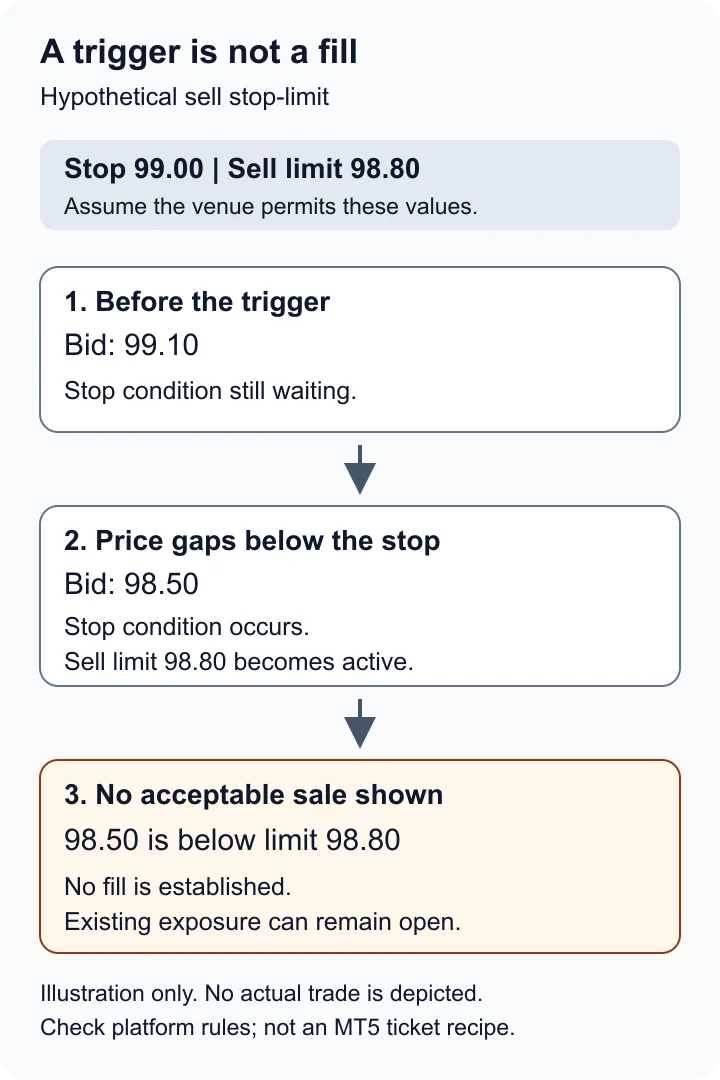
The 0.20 difference between 99.00 and 98.80 is a distance between order prices. It is not a cap on portfolio loss. If this sell was intended to close a long position, that position remains exposed until actual closing fills occur.
MT5 and cTrader express the second price differently
Do not transfer the examples above directly into a platform ticket. MetaTrader 5's documented pending-order rules describe Buy Stop Limit with a stop above the current Ask and a resulting Buy Limit below that stop. Sell Stop Limit has a stop below the current Bid and a resulting Sell Limit above that stop. These describe a move to the trigger followed by a potential retracement to the limit.
For instance, a hypothetical MT5 buy with stop 101.00 and resulting limit 100.80 waits for activation before placing the lower buy limit. A sell with stop 99.00 and resulting limit 99.20 places a higher sell limit after activation. Broker validation and instrument settings still apply. Exchange symbols can use exchange-specific trigger rules, commonly Last rather than the OTC Bid or Ask convention.
cTrader's order ticket documentation instead asks for an entry price and a limit range in pips. Its standard buy trigger uses Ask and sell trigger uses Bid, with trigger-side options documented in the ticket. Spotware's explanation illustrates a sell whose range sets the lowest acceptable sale below the entry price. Verify the instrument's pip size and resulting boundary; a numeric range is not interchangeable with an absolute price.
Follow the order lifecycle
Read events in sequence: submission, acceptance or rejection, waiting for the stop, activation of the limit instruction, and any executions. A cancellation, expiry or rejection is a different event from a fill. MetaQuotes' order properties distinguish the order state, original and remaining volume, and the separate stop-limit value.
A platform can represent the two stages with linked records. Preserve the available order identifiers and deal identifiers rather than assuming one unchanged ticket tells the whole story. If the only evidence is a submission response or chart screenshot, record execution as unconfirmed until the order and deal history resolves it.
A partial fill leaves a second task
Suppose a hypothetical sell requests five units to close an existing five-unit long position. After activation, two units execute at an acceptable price. Assuming no other activity, the account still holds three long units. A three-unit unfilled remainder may be working, canceled or expired depending on the accepted rules; none of those states reverses the two completed sales.
MT5's execution documentation identifies filling-policy and expiration settings separately. Their availability depends on the server. Use the lifetime and filling-policy reference when reconciling a remainder. Do not infer that every stop-limit must stay active indefinitely.
A cancel request can overlap an execution. Before placing a replacement, reconcile the cancellation response, late-arriving fills and current position. Otherwise, selling the original five units again could exceed the remaining three-unit position.
Checklist for copied or translated instructions
These are verification questions for any copying workflow, not a statement that TradeCopier supports every platform, order type or translation:
- Identify the event being copied. Is it the pending instruction, its activation or an executed deal? Those can produce different destination timing and exposure.
- Record both conditions. Capture direction, trigger price and trigger side, absolute limit or pip range, quantity, expiry and accepted order type.
- Check destination units. Validate the instrument mapping, pip size, volume step and price tick grid. Rounding either price changes the instruction.
- Test the unresolved cases. In an appropriate test environment, observe a gap beyond the limit, partial execution and cancellation. Mark an untested case as untested.
- Reconcile each account. Match source and destination records to actual fills and remaining positions. A source fill does not prove a destination fill.
If the destination lacks the same instruction, document that limitation before proceeding. Replacing a stop-limit with a stop-market changes the price condition even when the trigger is identical. Preserve errors and unknown outcomes in the record rather than treating them as successful copies.
Questions and answers
What is the difference between the stop price and the limit price?
The stop price helps determine when the order activates. The limit price determines the highest acceptable buy price or lowest acceptable sell price after activation. Neither value proves an execution occurred.
What happens if price gaps beyond my stop-limit price?
The stop can activate while the resulting limit has no acceptable execution. The order may remain unfilled under its lifetime rules, and an intended exit can leave the original position open.
Is a stop-limit safer than a stop-market?
They control different risks. A stop-limit adds a price boundary but can fail to execute. A conventional stop-market seeks market execution after activation but can fill away from its trigger. Neither guarantees a maximum loss.
Can a stop-limit order fill only partly?
Yes, where the accepted filling policy permits partial execution. Reconcile actual filled quantity, any working or canceled remainder, and the resulting position; activation alone is not a complete fill.
Are MT5 and cTrader stop-limit settings interchangeable?
No. MT5 documents a separate stop and resulting limit price with specific buy and sell relationships. cTrader documents an entry price and a pip limit range. Check trigger rules, units and accepted values on the actual account.
Does canceling a stop-limit close the position?
Canceling an unfilled order or remainder does not itself close existing exposure. Confirm the cancellation, reconcile any fills that occurred before it took effect, and inspect the remaining position.
Does a filled source stop-limit prove the follower filled?
No. Compare each account's accepted instruction, order events, actual fills and remaining exposure. Different quotes, quantity, settings or supported order types can produce different outcomes.
Sources and further checks
Use the current source for your exact instrument, account and platform. Referencing a general specification does not establish support for every TradeCopier workflow.
- Investor.gov: Types of Orders · Checked September 22, 2026
- MetaQuotes: Basic Principles of Trading · Checked September 22, 2026
- Spotware: Placing and Managing Orders · Checked September 22, 2026
- Spotware: Order Types and Triggered Versus Executed · Checked September 22, 2026
- MetaQuotes: Order Properties · Checked September 22, 2026
- MetaQuotes: Executing Trades · Checked September 22, 2026
Found an error? Send a correction with this page's address and a primary source. See our editorial standards for how we handle examples, claims and revisions.