Alternatives · Tradecopia · Last updated: 9 November 2026 · By TradeCopier Editorial Team
Tradecopia Alternative: Forex and CFD Trade Copiers
Tradecopia is a futures trade copier sold as a desktop app and two hosted tiers, with a 7-day trial on some plans. TradeCopier is a hosted copier for eight platforms, most of them forex and CFD platforms such as MT4, MT5 and cTrader, with a permanent Free plan. Choose by the platforms your accounts use, then compare hosting and cost.
This page compares the two products using published facts only. Vendor facts were checked on 9 November 2026. Where a fact is not stated, the page says so.
TradeCopier publishes this page and is one of the products compared. It is not endorsed by or affiliated with Tradecopia. Product names are used only to identify them.
Key takeaways
- Tradecopia describes its product as built for futures and multi-account prop trading. Its homepage names Tradovate, Rithmic and TopstepX, which TradeCopier does not list.
- Tradecopia’s 7-day trial covers Pro (Desktop) and Pro+ Lite on monthly or quarterly billing. TradeCopier’s Free plan has no time limit and includes 1 trading group and 3 accounts.
- Tradecopia’s homepage says: “All purchases are final and non-refundable, including charges after the free trial ends.” Read the refund terms of both products before paying.
- Tradecopia’s pricing page shows $49.99, $79.99 and $149.99 struck through beside $34.99, $59.99 and $119.99 a month on the quarterly option, while its FAQ lists the higher figures as monthly prices.
- Neither copier removes broker, prop-firm or trading risk. Test on a demo or evaluation account first.
TradeCopier platforms relevant to this comparison
These eight platforms are on TradeCopier’s supported list. Tradecopia’s homepage names NinjaTrader but none of the other seven. See the platforms page for setup routes.
 MetaTrader 4
 MetaTrader 5
 cTrader
 NinjaTrader 8
 DXtrade
 TradeLocker
 MatchTrader
 VertexFX
Tradecopia and TradeCopier, side by side
Tradecopia cells cite its own pages. TradeCopier cells come from this site’s pages and carry no vendor source.
What it is
- Tradecopia
- A copier built for futures and multi-account prop trading. Its site footer carries a © 2026 Tradecopia Solutions Inc. notice.Source: Tradecopia about page and Tradecopia homepage, checked 9 November 2026
- TradeCopier
- A hosted copier that routes trades from a source account to follower accounts across eight supported platforms. Limits are set by plan.
Where it runs
- Tradecopia
- Pro (Desktop) runs on your own Windows or macOS machine. Pro+ Lite is browser-based and hosted on ChartVPS or QuantVPS. Pro+ is a dedicated single-tenant VPS with a static IP.Source: Tradecopia pricing and Tradecopia FAQ, checked 9 November 2026
- TradeCopier
- A hosted routing layer. The router does not need a personal VPS. A broker or platform connection may still need an online terminal or connector.
Platforms named
- Tradecopia
- Tradovate, TradingView, ProjectX, TopstepX, Rithmic, NinjaTrader, Quantower, ATAS, Sierra Chart and Tradesea. The FAQ says Pro+ Lite and Pro+ can route TradingView strategy alerts by webhook from a leader on ProjectX, Rithmic or Tradovate. Its Tradesea page describes a direct Rithmic connection for Tradesea, and a comparison article mentions Sierra Chart via Rithmic. The homepage and FAQ give no integration depth for Quantower or ATAS.Source: Tradecopia homepage and Tradecopia FAQ, checked 9 November 2026
- TradeCopier
- MT4, MT5, cTrader, NinjaTrader 8, DXTrade, TradeLocker, MatchTrader and VertexFX. In the self-service menu inspected on 24 September 2026, MT5, TradeLocker and cTrader were visible. The others need support setup instructions.
Platforms the other does not list
- Tradecopia
- Its homepage list does not include MT4, MT5, cTrader, DXtrade, TradeLocker, MatchTrader or VertexFX.Source: Tradecopia homepage, checked 9 November 2026
- TradeCopier
- Does not list Tradovate, Rithmic, TopstepX, TradingView, ProjectX, Quantower, ATAS, Sierra Chart or Tradesea.
Free plan or trial
- Tradecopia
- 7-day free trial on Pro (Desktop) and Pro+ Lite, on monthly and quarterly billing only. No trial on Pro+ or yearly plans. A payment method is required, and there is one trial per user and payment method. Its free trade copier page says: “There is no separate limited free tier to outgrow.” No permanent free plan appears on the pages checked.Source: Tradecopia homepage, Tradecopia FAQ and Tradecopia free trade copier page, checked 9 November 2026
- TradeCopier
- Permanent Free plan with no time limit: 1 trading group and 3 accounts. It is not a seven-day trial.
Pricing, as of 9 November 2026
- Tradecopia
- The pricing cards default to Quarterly billing. They show Pro (Desktop) at $34.99, Pro+ Lite at $59.99 and Pro+ at $119.99 a month, which are the quarterly charges of $104.98, $179.98 and $359.98 billed every 3 months. The discount is 30%, 25% and 20% off the monthly list price, struck through on the cards as $49.99, $79.99 and $149.99, and it applies to a 3-month commitment instead of 12. The pricing page’s offer data lists annual prices of $419.92 for Pro, $719.91 for Pro+ Lite and $1,439.90 for Pro+, each described as rate locked for 12 months. The FAQ gives $49.99, $79.99 and $149.99 as monthly prices.Source: Tradecopia pricing and Tradecopia FAQ, checked 9 November 2026
- TradeCopier
- Free plan at no charge. Pro is $35 billed monthly or $348 billed yearly. Pro Plus is $100 billed monthly or $912 billed yearly.
Account limits
- Tradecopia
- Homepage claim: unlimited follower accounts and unlimited copied orders. Each account can belong to only one copy group at a time, and the vendor lists unlimited copy groups.Source: Tradecopia homepage and Tradecopia FAQ, checked 9 November 2026
- TradeCopier
- Free: 1 trading group and 3 accounts. Pro: 5 groups and 15 accounts. Pro Plus: 20 groups and 60 accounts. Extra accounts on paid plans cost $2 each. Confirm the add-on billing period at checkout.
Setup
- Tradecopia
- Connect leader and follower accounts, set a multiplier and risk limits for each follower, and test on a paper account before going live. Trades then mirror automatically.Source: Tradecopia homepage, checked 9 November 2026
- TradeCopier
- Create a Free account to inspect the connection flow for your platform. Test the exact route before live copying.
Prop and futures notes
- Tradecopia
- The FAQ says: “Compatibility is platform-driven, not firm-driven.” A consistency calculator has presets for Apex, Topstep, TakeProfitTrader, Tradeify, Elite and others, plus a prop firm tracker and drawdown monitoring. Per-firm compatibility is not confirmed.Source: Tradecopia FAQ and Tradecopia homepage, checked 9 November 2026
- TradeCopier
- Prop-firm copying depends on each firm’s written rules. Check them in writing before you connect an account.
Refunds
- Tradecopia
- All purchases are final and non-refundable, including charges after the free trial ends. The FAQ says a one-time courtesy refund can be requested from support, is not guaranteed, and carries a processing fee.Source: Tradecopia homepage and Tradecopia FAQ, checked 9 November 2026
- TradeCopier
- See the refund policy for the current terms.
Support
- Tradecopia
- Email or Discord. The FAQ says replies usually come within a few hours during support hours, which are not stated. A public status page is listed.Source: Tradecopia FAQ, checked 9 November 2026
- TradeCopier
- Reach the team through this site before you go live.
Vendor cells show published claims, which are not independently tested here. Confirm the checkout total before paying.
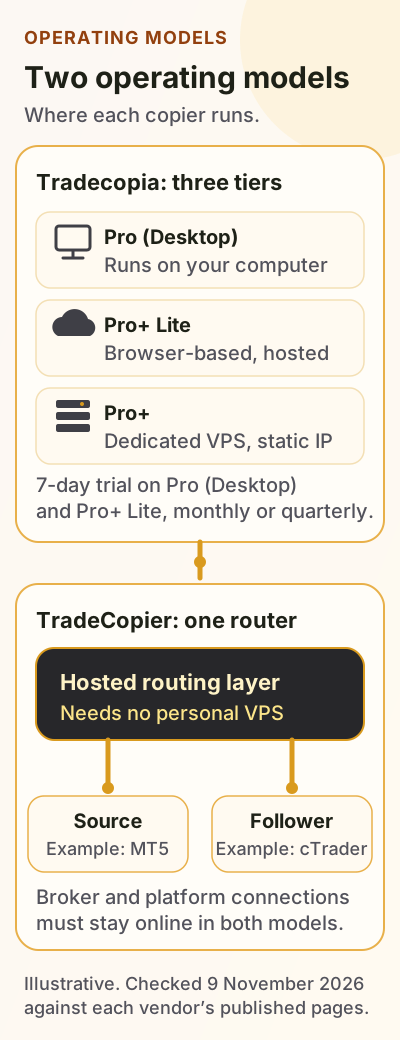
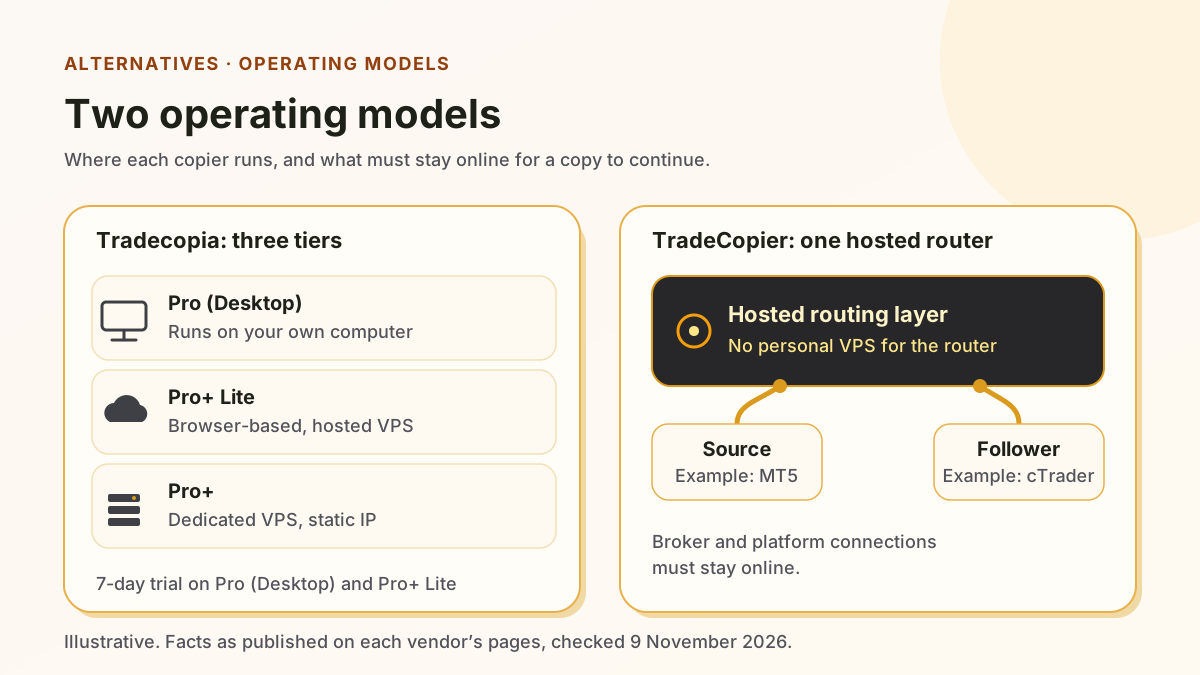
Two operating models, side by side
Tradecopia sells three tiers that differ by where the software runs. TradeCopier runs one hosted routing layer. Both models need the broker or platform connection to stay online.
Where Tradecopia may fit better
These points come from Tradecopia’s own pages. Each one is a vendor statement or claim, not a test result.
Futures platform coverage
Tradecopia’s homepage names Tradovate, Rithmic, TopstepX and TradingView, among others. TradeCopier’s list includes none of them. If your futures accounts use those platforms, check Tradecopia first.
Hosting in one product line
Pro runs on your own computer. Pro+ Lite and Pro+ are hosted, and Pro+ adds a dedicated VPS with a static IP.
Prop-firm tools
The consistency calculator, prop firm tracker and drawdown monitoring target prop-firm accounts. The site also says compatibility is platform-driven, not firm-driven.
Cross-platform routing
The FAQ says: “Every connection is independent.” A leader and a follower can sit on different platforms. Test any mixed pair on a demo or evaluation account before you rely on it.
A trial on two tiers
Pro (Desktop) and Pro+ Lite carry a 7-day trial. The homepage says: “Cancel before day 7 and pay nothing.” That gives you a way to test the copier, provided you cancel in time and accept the payment method requirement.
Staffed support
The FAQ describes email and Discord as answered by people. Support hours are not stated, so ask about response times before you start.
Where TradeCopier may fit better
These points come from TradeCopier’s own pages and plan limits. They do not rank the products overall.
Forex and CFD platforms
TradeCopier lists MT4, MT5, cTrader, DXTrade, TradeLocker, MatchTrader, VertexFX and NinjaTrader 8. Tradecopia’s homepage names none of the first seven.
A permanent Free plan
The Free plan has no time limit and includes 1 trading group and 3 accounts. Tradecopia’s trial lasts 7 days, and Pro+ has no trial.
No personal VPS for the router
The router is hosted, so it needs no personal VPS. A broker or platform connection may still need an online terminal or connector.
Platforms TradeCopier does not list
This is the key difference for futures users. Read it before you choose.
TradeCopier does not list Tradovate, Rithmic, TopstepX, TradingView, ProjectX, Quantower, ATAS, Sierra Chart or Tradesea. If your broker or prop firm uses one of them, the evidence on this page does not show a TradeCopier route. A firm’s own integrated copier is not a TradeCopier connection.
Platform support is not the same as a working route. Broker permissions, account mode, copy direction and order actions decide whether a copy works. Confirm each one on a test route, as the platforms page explains.
The same caution applies to Tradecopia. Its FAQ describes TradingView webhook alerts from a ProjectX leader on Pro+ Lite and Pro+, and its own pages describe Tradesea and Sierra Chart connections through Rithmic. Its homepage and FAQ give no integration depth for Quantower or ATAS, so test those routes before you rely on them.
How to choose between them
Use this checklist with the table above. It does not replace a test on your own accounts.
- Choose Tradecopia if your source and follower accounts are on one of the platforms its homepage names, and you accept its no-refund terms in exchange for a trial.
- Choose TradeCopier if your accounts run on MT4, MT5, cTrader, DXTrade, TradeLocker, MatchTrader, VertexFX or NinjaTrader 8, and you want a permanent Free plan to test your route first.
- If you look at Tradecopia, note that Pro runs on your computer, while Pro+ Lite and Pro+ are hosted.
- Compare the full monthly cost, not the headline. Tradecopia’s monthly figures differ between its pricing cards and its FAQ. TradeCopier’s paid extra accounts cost $2 each.
- Check the exact route before you go live: broker, account mode, copy direction and order actions for each source and follower pair.
Risk note
Copying multiplies exposure: a loss on the source is copied to every follower. Prop-firm and broker rules differ by account, and a copier does not change them. Test on a demo or evaluation account, reconcile each copied trade with the broker, and read each vendor’s current terms before paying. This page is not advice on either product or any trading strategy.
Tradecopia alternative questions
It depends on the tier. Pro runs on your own computer, and the FAQ recommends a VPS for 24/7 operation so the copier does not depend on a local machine staying on. Pro+ Lite and Pro+ are hosted on ChartVPS or QuantVPS, and Pro+ is a dedicated single-tenant VPS.
Start with your source and follower platforms. TradeCopier lists MT4, MT5, cTrader, NinjaTrader 8, DXTrade, TradeLocker, MatchTrader and VertexFX, and does not list Tradovate or Rithmic. Tradecopia’s homepage names Tradovate and Rithmic. Test the exact route on a demo account before you rely on either product.
TradeCopier does not list TopstepX among its eight platforms. Tradecopia’s homepage names TopstepX. For any prop-firm route, check the firm’s own rules and ask support about the exact connection before you use it on an account.
Its homepage says: “All purchases are final and non-refundable, including charges after the free trial ends.” Its FAQ says a one-time courtesy refund can be requested from support, is not guaranteed, and carries a processing fee. Read the [refund policy](/refund) for TradeCopier’s own terms.
Tradecopia facts: its homepage, pricing page, FAQ and about page, checked 9 November 2026. TradeCopier facts: this site’s pricing, platforms and policy pages.