Trade Copier Order Flow:
From Request to Reconciliation
Short answer: An automated trade copier attempts to translate an eligible action on a source account into a request for a follower account. Route rules, a destination broker response, actual fills and the follower's resulting position are separate stages. A submitted or accepted request alone does not prove that a trade filled, and different accounts can have different outcomes.
Publisher disclosure: TradeCopier publishes this educational guide as a product provider. The workflow below is a generic diagnostic model informed by platform documentation; it is not a verified diagram of TradeCopier's internal architecture. Public information reviewed for this update does not establish one universal event trigger, retry policy, event ordering, complete log record or tested result for every source-to-follower route.
A generic trade copier workflow, step by step
Use these stages to ask where an event stopped and what record would confirm the next state. Real implementations can combine, omit or name stages differently.
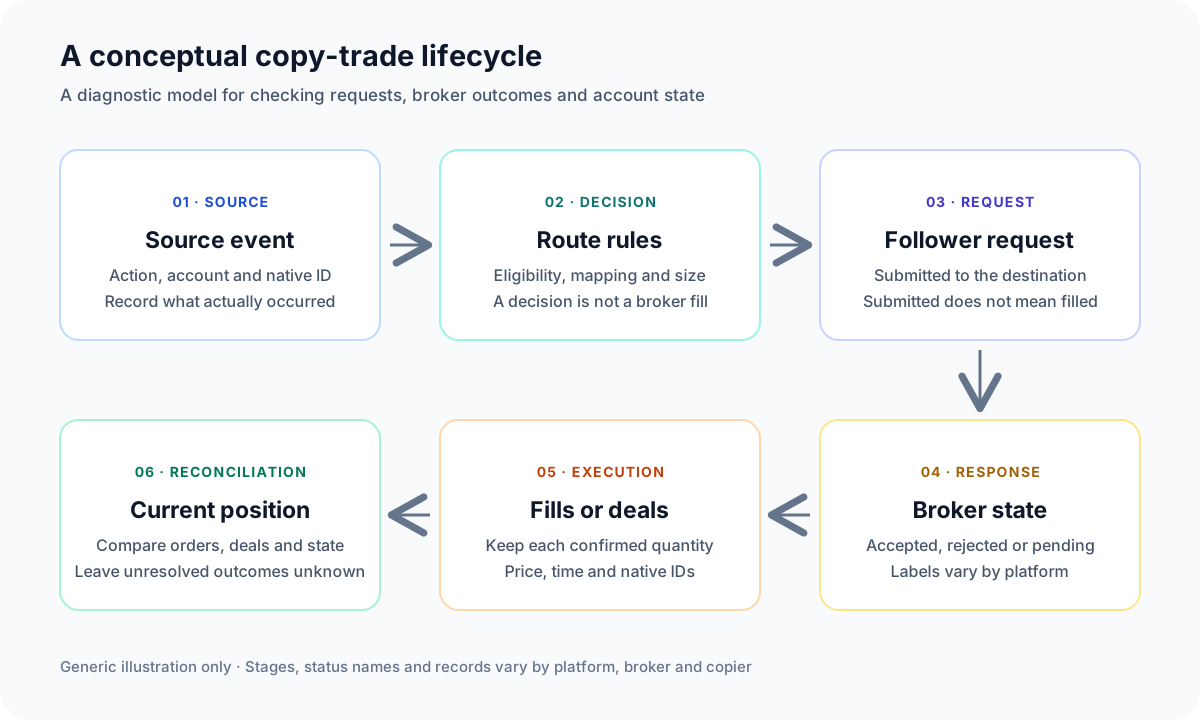
- Source event or instruction. Identify the account, instrument, action, amount and native source reference. An opened, changed or closed position may involve more than one underlying order or deal; record the actual platform event instead of relying on a screen label alone.
- Eligibility and translation rules. A copier may evaluate whether the source action is eligible for a destination, then apply configured filters, a symbol candidate or mapping, and a quantity rule. A selected mapping or calculated amount is a decision record, not proof that the destination broker accepts it.
- Destination request. The system prepares and submits an order or account operation using the destination connection. Retain the exact requested action, symbol and quantity, plus any request or correlation identifier the interface exposes.
- Broker response and order state. The destination platform may report a rejection, acceptance for processing, a working order, a cancellation or another platform-specific state. Read the documented meaning of the status; “accepted” does not always mean “filled.”
- Fills or deals. A request can result in one fill, several fills, a partial fill or no confirmed fill. Keep each deal identifier, quantity, price and timestamp linked to the order where the platform provides that relationship.
- Position reconciliation. Compare the destination's current orders, deals and position with the request and source event. The present account state can differ from an earlier response if later events changed the order or position.
What does each status actually establish?
Exact labels differ by API and broker, so preserve the native response and its documentation. This table gives a review vocabulary, not a universal status enum.
| Observation | What it can establish | What still needs checking |
|---|---|---|
| Evaluated but not submitted | A rule or validation stage produced a decision before destination submission. | Which rule, configuration version and destination caused the decision. |
| Submitted or accepted | A request was sent, or the documented interface accepted it for processing. | Whether it remains active, was later rejected, or produced any fills. |
| Rejected | The recorded broker or platform response reports an error for that operation. | Whether a separate or earlier request already created a working order, deal or position. |
| Partially filled | Some quantity is confirmed as executed. | Every linked fill, the remaining working or canceled amount, and the current position. |
| Filled | The platform reports the order as filled under its own status rules. | Confirmed deal details and the position after any later changes. |
| Unknown | The available evidence does not resolve the outcome, for example because a response or account snapshot is missing. | Current broker orders, deals and positions before anyone considers a follow-up action. |
Fictional quantity example: if a destination request asks for 1.00 unit and the broker confirms 0.60 filled while 0.40 remains working, record 0.60 as filled and 0.40 as still working. Do not label the full 1.00 filled or the 0.40 failed. If the working part is later canceled, retain that later state and still reconcile the confirmed 0.60 against the destination position. The numbers are an arithmetic illustration, not a product test or trading instruction.
When should an outcome stay unknown?
If an acknowledgement or account snapshot is missing, keep the outcome marked unknown; absence of a response does not establish that the destination received nothing. Before a follow-up action is considered, reconcile the destination's current orders, deals and position. For the wider incident workflow, use the existing trade copier troubleshooting guide. This article does not prescribe a retry, reversal, close or other trading action.
What do official platform documents illustrate?
Platform documentation shows why a request, response and completed execution should be read as separate records. MetaQuotes explains that a true return from MQL5 OrderSend means its basic checks succeeded, not that a market order finished executing; the order may be placed for further processing. Its OnTradeTransaction reference describes several transaction events arising from one request and cautions that event arrival priority is not guaranteed.
cTrader's Open API message reference defines execution messages with platform-specific types such as accepted or filled and optional references to an order, deal and position. It also documents separate order-error, order-details and reconciliation messages. These are examples of cTrader API concepts; they do not establish that every copier uses the same interface or sequence.
Keep routing time separate from broker execution
A useful test names the beginning and end of every interval. For example, record when the source event was observed, when the destination request was submitted, when the broker responded, the time of each confirmed fill and when the current position was checked. Use the platform's timestamp and clock basis, and note whether clocks are synchronized. A router interval ends at a different point from a broker acknowledgement or fill interval; combining them without stating the measurement boundary can make a result misleading.
No dated, route-specific trace or measurement method is published in this guide. It therefore makes no latency, uptime, fill-quality or compatibility benchmark claim. Confirm the exact broker, account type, direction and order actions with current product evidence before relying on a workflow.
How is a trade copier different from copy trading?
A trade copier usually describes software that relays eligible activity between selected accounts. “Copy trading” can also refer to a social platform where users discover and follow another provider's strategy. For the broader categories and their differences, start with what copy trading means and how it differs from a trade copier, then return here for the narrower request-to-reconciliation workflow.
Sources were checked on September 24, 2026. Platform interfaces and product documentation can change; verify the current version and the exact account route.
Quick answers
Frequently Asked Questions
Find answers to the most common questions about this topic.
Does submitting a copied order mean the follower trade filled?
No. Submission or acceptance can precede execution. Check the destination platform response, linked fills or deals, any remaining order quantity and the current position.
Can one order request create more than one platform event?
Yes, some platform APIs document multiple order, deal and position events for a request. MetaQuotes describes this behavior for MQL5; event sequences and labels differ across platforms and do not establish a copier’s internal implementation.
What should I do if a copier shows no response?
Treat the outcome as unknown until you inspect the destination broker’s active orders, order history, deals and current position. A missing response alone does not prove that no request was received.
What does a partial fill mean in a trade copier?
It means only part of the requested amount is confirmed as executed. Record each confirmed fill and the remaining working, canceled or unresolved amount separately, then inspect the current destination position.
Does this article document TradeCopier’s internal event system?
No. The stages are a generic diagnostic model based on public platform documentation. This article does not verify TradeCopier’s event trigger, retries, event ordering, complete log coverage or every route’s behavior.
Is routing latency the same as broker execution time?
No. Routing, broker acknowledgement, fills and position visibility are different intervals. A meaningful measurement names its timestamp source and exact start and end events.