Trade Copier Lot Size Limits:
Order Caps and Total Exposure
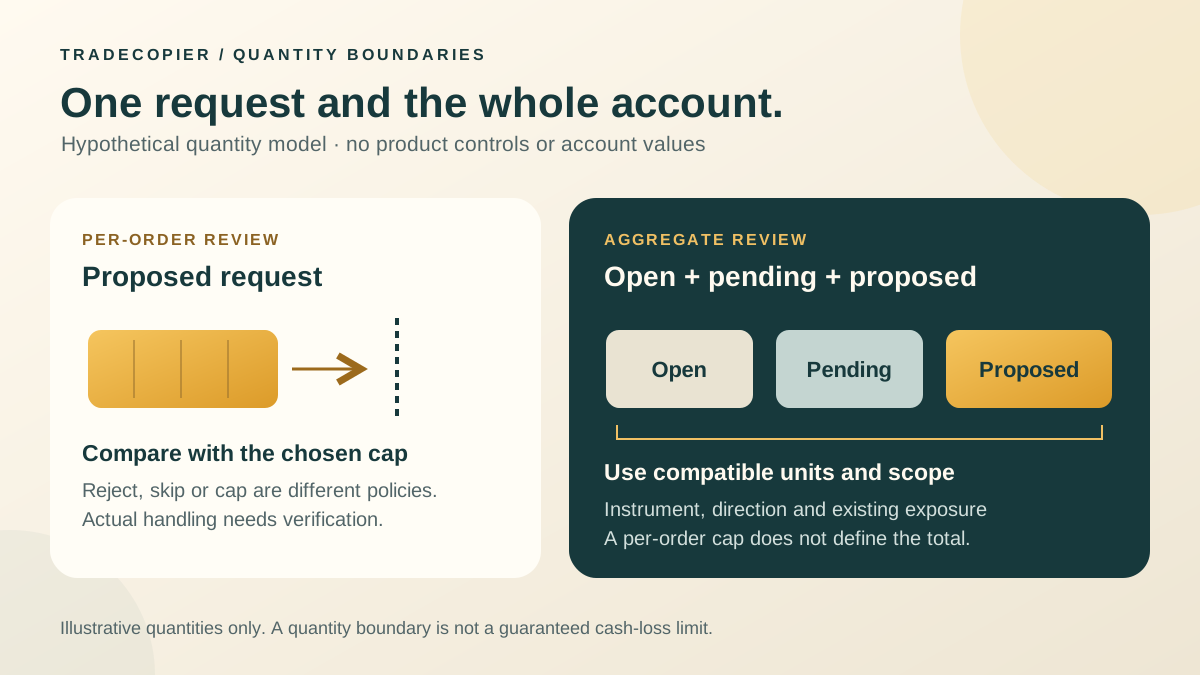
Trade copier lot-size limits need three separate checks: whether the destination broker accepts the requested quantity, what the copying policy does when a quantity is outside its boundaries, and how much exposure already exists or could result from pending orders. Passing a per-order maximum does not establish that the account’s total exposure is acceptable.
This guide uses hypothetical settings to explain reject, skip and cap policies. It does not verify which policy TradeCopier applies on any particular connection. Confirm the documented behavior for the platform, account and product version, then compare a controlled test with the destination’s actual records.
Separate broker specifications from an operator’s limit
MetaQuotes’ symbol properties distinguish minimum volume, maximum volume, volume step, directional volume limit and contract size. Read them for the destination symbol and account; a familiar symbol name or lot number does not establish equivalent terms across brokers.
- Minimum and maximum: the permitted size of an individual trading operation.
- Step: the permitted quantity increment. A value can lie between minimum and maximum yet fail the increment rule.
- Directional limit: the symbol’s combined open-position and pending-order volume in one direction, where that broker limit applies.
- Operator cap: a separately chosen ceiling for a proposed copied order. It may be stricter than the broker maximum.
The MetaQuotes volume guide explains that requests below minimum, above maximum or outside the step can produce an error. It also notes that a zero SYMBOL_VOLUME_LIMIT can mean that this particular aggregate limit is not imposed. That is different from a failed specification lookup. Preserve missing values as unavailable, and do not interpret absence of this broker limit as absence of economic risk.
Test the exact boundary, not just a typical order
Assume one fictional destination symbol has a broker minimum of 0.01 lot, maximum of 2.00 lots, step of 0.01 lot and directional limit of 3.00 lots. An operator separately chooses a 0.75-lot per-order cap. These are example inputs, not TradeCopier defaults or current broker specifications.
For this table only, assume there is no existing position or pending order. The broker interval is inclusive: 0.01 ≤ requested lots ≤ 2.00. The operator cap permits quantities no greater than 0.75, while retaining the broker minimum and step. Passing these checks is not an execution guarantee.
| Requested lots | Broker min/max/step | Operator cap 0.75 | Interpretation |
|---|---|---|---|
| 0.00 | Fails minimum | Below cap | No valid new-entry quantity |
| 0.01 | Passes at minimum | Passes | Other checks still required |
| 0.75 | Passes | Passes at cap | Equality is permitted |
| 0.76 | Passes | Exceeds cap | Policy decision required |
| 2.00 | Passes at maximum | Exceeds cap | Broker validity does not override policy |
| 2.01 | Exceeds maximum | Exceeds cap | Requested quantity fails both ceilings |
Check off-step quantities separately; displaying two decimal places is not itself validation. If a chosen cap falls below the broker minimum, no new-entry quantity satisfies both. Increasing a tiny request to the minimum changes exposure and should never be hidden as a harmless correction.
Reject, skip and cap are different policy choices
Use explicit terminology in the acceptance test:
- Reject: refuse the proposed instruction and record a failure reason requiring review. A local policy rejection is distinct from a broker rejecting an already submitted request.
- Skip: intentionally omit the copy under a documented eligibility rule and record that decision. No destination order is the expected outcome, rather than an unexplained missing trade.
- Cap: replace an oversized proposed quantity with a smaller permitted quantity, then validate the revised request against every other constraint. Record both quantities and the rule that changed them.
These are design alternatives, not a list of verified TradeCopier settings. A hypothetical cap reducing 1.20 lots to 0.75 changes the intended quantity by 0.45 lot, or 37.5%. It may alter the follower’s strategy proportions even if execution succeeds. The initial lot-multiplier calculation and the later boundary decision need separate records.
Define whether a skipped instruction can be reconsidered later; a delayed entry is not equivalent to the original event. Do not split an oversized order into smaller orders merely to evade a stated limit. Reductions, complete closes and reversals also need separate tests: applying an entry-only restriction indiscriminately can interfere with an intended exit.
Several small orders can exhaust the directional limit
Keep the same hypothetical settings and start with an empty account for this symbol. The following sequence assumes each stated fill or pending-order acceptance is confirmed before the next instruction. All orders are buys, so no opposite-position or closing semantics complicate the example.
| Confirmed event | Open buy volume | Unfilled buy orders | Directional total |
|---|---|---|---|
| A: buy 0.75 fills | 0.75 | 0.00 | 0.75 |
| B: buy 0.75 fills | 1.50 | 0.00 | 1.50 |
| C: buy limit 0.75 accepted | 1.50 | 0.75 | 2.25 |
| D: buy stop 0.75 accepted | 1.50 | 1.50 | 3.00 |
| E: another 0.01 proposed | 1.50 | 1.50 | Would become 3.01; fails limit |
Event D reaches the inclusive 3.00-lot boundary. Event E satisfies the individual minimum, step and cap but would exceed the directional limit. Pending volume is a commitment to possible later exposure; it is not already an executed position.
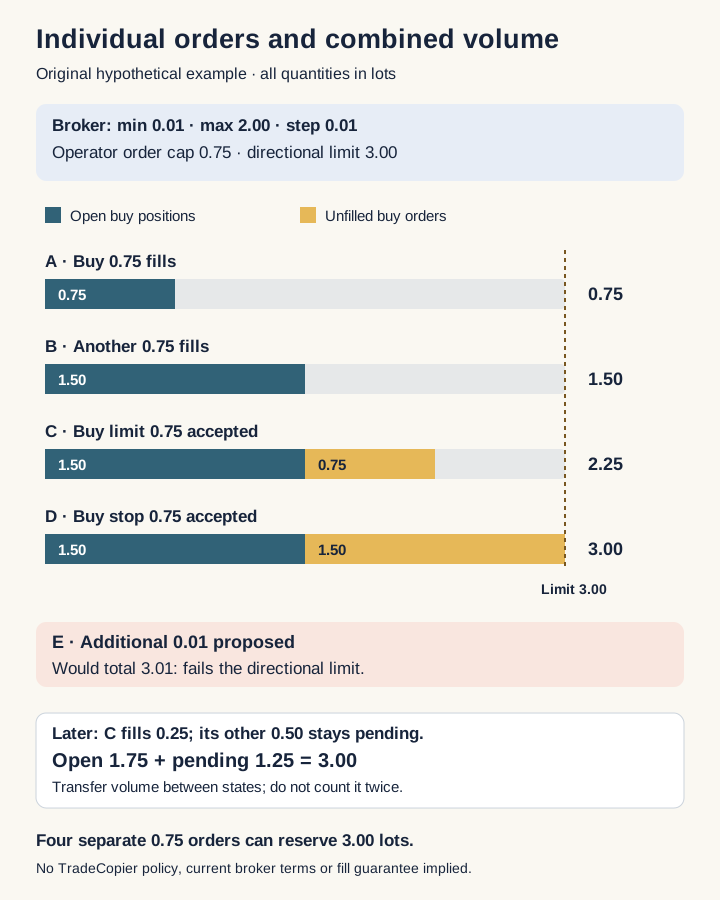
If C subsequently fills 0.25 lot and its remaining 0.50 stays pending, open buy volume becomes 1.75 and unfilled buys become 1.25, still totaling 3.00. Do not add the fill while retaining C’s original pending quantity. Likewise, requesting D’s cancellation does not establish that its volume is released; reconcile the confirmed result first.
Include manual orders and other strategies on that destination symbol. Two simultaneous proposals can each read the same apparent headroom, so a workflow needs a defined way to account for in-flight requests and reconcile changes. A stale snapshot cannot establish that both new instructions fit.
Account mode changes what the next deal does
MetaTrader 5’s position-accounting documentation distinguishes netting from hedging. A netting account has one common position per symbol: an opposite deal can reduce, close or reverse it. Hedging accounts can hold separate opposing positions; opening a sell is not automatically the same instruction as closing a buy.
On a netting account, a fully executed sell of 0.50 against a 1.50-lot buy leaves a 1.00-lot buy. On a hedging account, a new 0.50-lot sell can instead coexist with 1.50 lots bought: gross open quantity is 2.00 lots and net directional quantity is 1.00 lot long. Identify the intended action and position references rather than assuming the sign alone defines a close.
Translate lots into exposure without calling it maximum loss
For a separate illustrative EURUSD contract, assume one lot represents 100,000 EUR and the comparison price is 1.10 USD per EUR. A 0.75-lot order represents 75,000 EUR, or 82,500 USD notional. The hypothetical hedged book above has gross notional of 200,000 EUR and net long notional of 100,000 EUR, equivalent to 220,000 USD and 110,000 USD at that stated price.
These are exposure descriptions, not margin requirements or loss ceilings. Different contract sizes, price changes, currency conversions, costs and execution conditions change the economic result. Equal lot caps across different instruments do not imply equal exposure. Pending orders belong in a separate potential-exposure scenario rather than being mislabeled as current holdings.
Keep an acceptance and reconciliation record
Download the blank lot-limit review worksheet. Its ten rows are marked not_recorded, with all measurements and outcomes blank. It is a manual record, not an automatic checker. Use account aliases and redacted references; record the destination specification timestamp, quantity before and after policy, intended action, open and pending totals, in-flight requests, result code and confirmed final state.
MetaQuotes’ OrderCheck documentation warns that a successful check does not guarantee execution. OrderSend documentation likewise distinguishes accepting a request for processing from executing it. Preserve these stages separately, including partial fills, rejections and unconfirmed outcomes. Missing evidence stays unavailable, not zero.
Before using a limit in a live copying workflow, test the exact boundary, competing requests and closing behavior in an appropriate demo setup. Recheck after a platform, broker specification or configuration change. The useful outcome is a documented policy and reconciled destination state, not a promise that automatic adjustment preserves a strategy or guarantees account safety.
Quick answers
Frequently Asked Questions
Find answers to the most common questions about this topic.
What do trade copier lot-size limits control?
A per-order limit constrains a proposed quantity, subject to its documented policy. Broker minimum, maximum and step, aggregate directional volume, account mode and economic exposure still require separate checks.
Does TradeCopier automatically cap every oversized order?
This guide does not verify that behavior for a particular TradeCopier connection. Reject, skip and cap are different design choices. Confirm the documented policy, its precedence and the destination result rather than assuming a safe automatic adjustment.
Are the minimum and maximum quantities inclusive?
The hypothetical example permits the broker boundaries of 0.01 and 2.00 lots and the operator cap of 0.75 lot. Other constraints still apply, and passing an equality check does not guarantee execution.
Why can an order below the per-order cap still exceed a limit?
Open positions and pending orders can already consume the same-direction allowance. In the example, 1.50 open buy lots plus 1.50 pending buy lots reaches 3.00; another 0.01 lot would exceed it despite satisfying the individual size checks.
Should a quantity below the broker minimum be increased automatically?
Increasing it changes exposure. The behavior must be an explicit, validated policy; if the chosen cap is below the broker minimum, no valid new-entry quantity satisfies both. Do not disguise that conflict as a harmless correction.
Do opposing positions cancel each other for every limit?
No. Netting and hedging accounts account for opposing trades differently, and directional volume checks differ from net economic exposure. A hedged book can have a small net quantity while retaining larger gross positions and costs.
Does an accepted request or successful check prove the trade filled?
No. MetaQuotes distinguishes checking a request, accepting it for processing and executing it. Reconcile result codes, deals, remaining pending quantity and final positions, including partial fills and unconfirmed outcomes.
Does a lot cap guarantee a maximum monetary loss?
No. Contract size, price movement, conversion, costs and execution determine economic outcomes. A lot count or notional amount is not a margin requirement or a guaranteed loss ceiling.









