Free
Permanent
1 trading group and 3 total accounts
Alternatives · Last updated: 7 November 2026 · By TradeCopier Editorial Team
TradeCopier is a hosted alternative to FX Blue Personal Trade Copier. According to FX Blue, checked 7 November 2026, that copier duplicates orders between MT4 or MT5 instances on the same computer, and it is free and does not expire. TradeCopier runs its routing layer in the cloud, so the router needs no personal VPS.
TradeCopier is one of the products compared here. This page is not affiliated with or endorsed by FX Blue. The FX Blue name belongs to its owner and is used only to identify the product compared (nominative use). FX Blue facts were checked on 7 November 2026 against FX Blue’s product page, store page, MT4 user guide and FAQ.
A hosted alternative to FX Blue is a different way to copy trades between MT4 or MT5 accounts. FX Blue Personal Trade Copier copies between MT4 or MT5 instances on the same computer, according to FX Blue, and its user guide says it needs permanently running copies, which can sit on a home PC or a VPS. TradeCopier hosts its routing layer in the cloud. Which model fits depends on where your terminals run, and what must stay online for copying to continue.
This page compares operating models and published facts. It does not measure profit, latency or fill quality.
The table compares operating models and published facts as of 7 November 2026. It does not compare profit, latency or fill quality, which this page does not measure.
Swipe the table sideways to see every column.
| Category | FX Blue Personal Trade Copier (according to FX Blue, checked 7 November 2026) | TradeCopier (checked 7 November 2026) |
|---|---|---|
| Where the copier runs | Between MT4 or MT5 instances on the same computer, according to the FX Blue product page | Hosted routing layer, with a browser dashboard for setup and monitoring |
| Personal VPS for the router | Not required, according to the FX Blue FAQ, which adds that you need a VPS if you do not want to leave your home PC running all the time | Not needed for the hosted router |
| Platforms | MT4 and MT5 versions, which the store page says are compatible with each other, and copying works in either direction between MT4 and MT5 | MT4, MT5, cTrader, NinjaTrader 8, DXTrade, TradeLocker, MatchTrader and VertexFX |
| Connection method | The store page says to use the MT4 EA in MT4 and the MT5 EA in MT5 | MT5, TradeLocker and cTrader in the self-service menu; MT4, NinjaTrader 8, DXTrade, MatchTrader and VertexFX are support-assisted |
| Price, as of 7 November 2026 | Free and does not expire, according to the FX Blue store page. The installer expires, but the EA does not expire once installed | Permanent Free plan; Pro $35 billed monthly or $348 billed yearly; Pro Plus $100 billed monthly or $912 billed yearly |
| Account capacity | No fixed limit; the store page says the practical limit is how many MT4 or MT5 copies your computer can run. Separately, FX Blue’s MT4 user guide notes that MT4 lets only 8 EAs trade at once, which limits its optional Receiver-Worker EA | Free: 1 trading group and 3 total accounts. Pro: 5 groups and 15 accounts. Pro Plus: 20 groups and 60 accounts. Paid extra accounts: $2 each |
| What must stay online | The user guide says the copier requires permanently running MT4 or MT5 copies | Broker and platform connections, plus any connector your route requires |
| Source and date | FX Blue product page, FX Blue store page, MT4 user guide and FX Blue FAQ, checked 7 November 2026 | TradeCopier pricing and platform pages, checked 7 November 2026 |
FX Blue’s pages can change. Check them before you install or pay, and treat this table as a dated summary rather than a live feed.
The diagram shows where each copier sits. Broker and platform connections apply to both models.
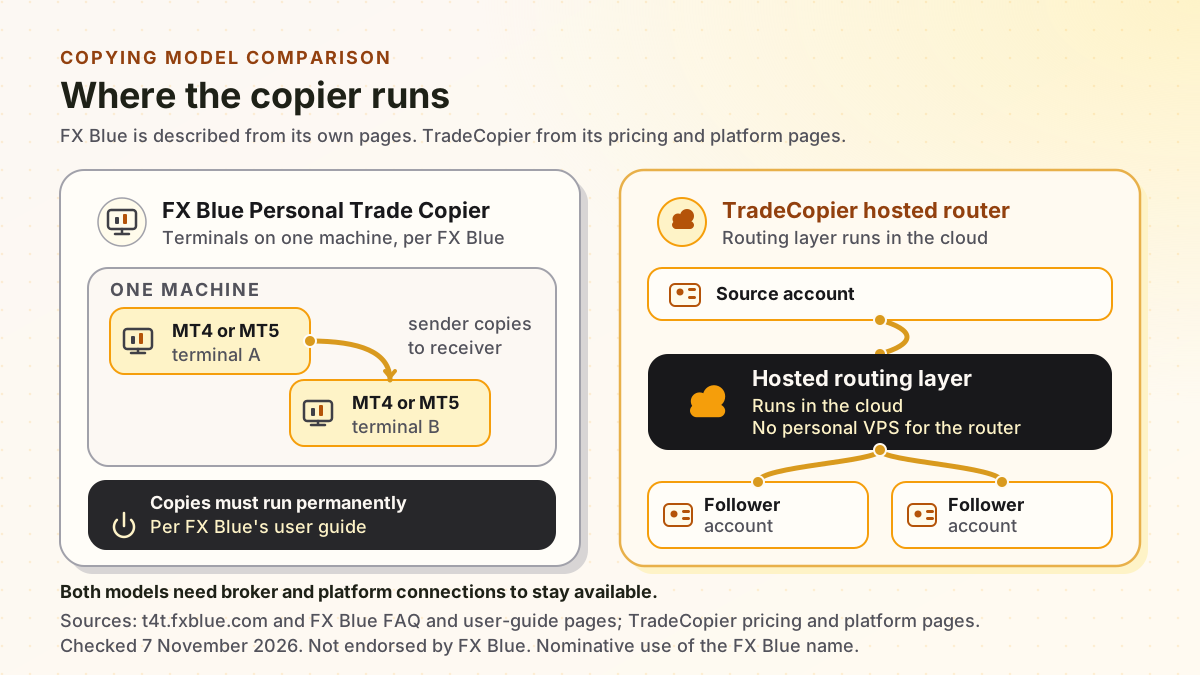
Swipe the diagram sideways to read its labels.
FX Blue’s same-computer model suits a setup where every terminal sits on one machine that you control. Its free price and its feature list are real advantages for a simple copy between MT4 or MT5 terminals. The feature points below are taken from FX Blue’s product page, checked 7 November 2026.
A hosted router suits copying across several platforms, or a setup where the routing layer should not depend on one home computer.
Start with the account route you want to copy and test it before you copy live money. MT5, TradeLocker and cTrader are self-service in the account menu. MT4, NinjaTrader 8, DXTrade, MatchTrader and VertexFX are support-assisted, so ask support for their current steps.
Record each broker, platform, account mode and symbol name. Note the direction of each route, such as MT4 to MT5.
MT5, TradeLocker and cTrader appear in the self-service account menu. MT4, NinjaTrader 8, DXTrade, MatchTrader and VertexFX are support-assisted, so ask support for current setup steps before you connect.
Map symbols, set follower sizing and risk limits, then test open, modify and close actions on a demo account before any live use.
Compare copier activity with the broker’s orders, fills and open positions. A dashboard event alone does not prove a filled trade.
Moving a working setup is where copying errors appear. These checks apply whichever copier you choose.
Keep the old copier running until the new route has matched several sessions of real activity on a demo or small live account. Stop the old route only after you have confirmed that every expected open, modify and close action arrived, and that the broker positions match your records.
The Free plan is permanent within its limits. It has no paid extra-account add-ons.
Permanent
1 trading group and 3 total accounts
$35 billed monthly or $348 billed yearly
5 trading groups and 15 accounts
$100 billed monthly or $912 billed yearly
20 trading groups and 60 accounts
Count both source and follower accounts. Disconnecting an account may not free its slot, because the pricing FAQ says stored accounts that are not archived count toward the limit on the MT5, TradeLocker and cTrader connections it reviewed, so check the usage shown in your dashboard before you connect or change accounts. Paid plans add $2 per additional account. The billing period for that add-on is still being confirmed, so check the final total before you pay. Read the pricing page for the current terms.
How hosted routing works and what must stay online.
Platform choices and which setups are self-service.
Free, Pro and Pro Plus limits and account add-on details.
Hosted and local free options with dated vendor facts.
Cloud, local, community code and demo access compared.
According to FX Blue’s store page, checked 7 November 2026, the copier is free and does not expire. The installer expires, but the EA does not expire once installed. FX Blue’s MT4 user guide licenses it for personal use only and says it may not be the basis of a commercial trade-copying service. Vendor terms can change, so check FX Blue’s pages before you install.
According to FX Blue’s FAQ, checked 7 November 2026, you do not have to use a VPS to run the Personal Trade Copier, but if you do not want to leave your home PC running all the time, you need a VPS instead. Its user guide says the copier requires permanently running MT4 or MT5 copies, and that a VPS must be a proper real VPS, not shared hosting.
TradeCopier is a hosted copier that can be compared with FX Blue Personal Trade Copier for the same job, which is copying trades between accounts. The models differ: FX Blue’s copier runs alongside your terminals on a computer you control, or on a VPS if you choose one, while TradeCopier hosts its routing layer. This page is published by TradeCopier and is not endorsed by FX Blue.
TradeCopier supports MT4, MT5, cTrader, NinjaTrader 8, DXTrade, TradeLocker, MatchTrader and VertexFX. The self-service account menu currently shows MT5, TradeLocker and cTrader. Ask support for setup steps for the other platforms and confirm your exact route before live use.
The Free plan is permanent within its limits: one trading group and three total accounts, with no paid extra-account add-ons. Disconnecting an account may not free its slot, because the pricing FAQ says stored accounts that are not archived count toward the limit on the MT5, TradeLocker and cTrader connections it reviewed, so check the usage shown in your dashboard before you connect or change accounts.
Only after you have confirmed the route, tested the order actions you use on a demo account, and reconciled the results with your broker. Trading carries a risk of loss, losses can exceed expectations, and no copier guarantees profit or identical fills.

Connect supported accounts with configurable sizing, risk controls, activity logs, and alerts.