Free plans · Last updated: 7 November 2026 · By TradeCopier Editorial Team
Free Cloud Trade Copier Comparison for MT4 and MT5
TradeCopier is a cloud trade copier for MT4, MT5 and other platforms, with a hosted routing layer that needs no personal VPS. Its permanent Free plan includes 1 trading group and 3 trading accounts in total, with no time limit.
This page compares free cloud trade copiers and free local copiers for MT4 and MT5. It shows where each product runs, what its free terms limit and which platforms are self-service, so you can choose a model before you connect a live account. It does not rank products or measure speed, profit or fill quality.
Product names are used only to identify the products compared. This page is published by TradeCopier and is not endorsed by any product named on it.
What a free cloud trade copier means in practice
A cloud trade copier runs its routing layer on hosted infrastructure. You connect source and follower accounts through a browser instead of installing a copier on your own PC or server. A local copier works the other way: the terminals and the copy software run on a machine you control, and that machine has to stay on.
“Free” can mean very different things. TradeCopier’s Free plan is permanent within its limits. Other products offer a prepaid credit, a free beta, a self-hosted plan with caps, or a local install that states no account limit. The table below sets out each vendor’s own wording.
Key takeaways
- TradeCopier’s Free plan is permanent within its limits: 1 trading group and 3 trading accounts in total, with no time limit.
- Hosted and local copiers differ in what has to keep running. A hosted router needs no personal VPS, but broker and platform connections must stay available in both models.
- Free terms vary a lot. Some products offer a prepaid credit, a free beta or a self-hosted plan with caps. Others are local installs, some of which state no account limit.
- Platform coverage differs. Several products list only MT4 and MT5, while TradeCopier lists eight platforms, and support must set up some of them.
- Test any route on a demo account and reconcile it with your broker before you rely on it.
Free cloud and free local trade copiers compared
Each row is one product, and each cell uses the vendor’s own wording where possible. “Not stated” means the vendor pages checked on 7 November 2026 do not say. Several products sell paid tiers. This table covers free terms only and does not compare prices.
Swipe the table sideways to see every column.
| Product | Hosted or local | Free limit | Platforms | Self-service | Source |
|---|---|---|---|---|---|
| TradeCopier (this page) | Hosted routing layer. No personal VPS is needed for the router. Broker and platform connections must stay available. | Permanent Free plan: 1 trading group and 3 trading accounts in total, with no time limit. | MT4, MT5, cTrader, NinjaTrader 8, DXTrade, TradeLocker, MatchTrader and VertexFX. | Self-service: MT5, cTrader and TradeLocker. The other platforms are support-assisted. | TradeCopier pricing and platform pages, as checked on 7 November 2026 |
| Duplikium (trade-copier.com) | Cloud-based, per the homepage: “no PC to run, and no VPS to pay.” The pricing page does not state hosting. | Credit-based: a free prepay starting credit of 20 EUR, and the pricing page says “Connect as many trading accounts as you need”. The credit lasts a limited number of days that depends on the account count; the pricing page gives examples from 20 days with 2 accounts to 2 days with 20 accounts, while its free-plan page states a 30 EUR credit with correspondingly longer examples. SMS verification is needed to activate the credit. | Homepage: MT4, MT5, cTrader, DXtrade, Tradovate/NinjaTrader, Fortex, TradingView and more. Pricing page also lists FXCM and LMAX; Tradovate, Fortex and NinjaTrader are marked beta. | Homepage: “Easy set up in just 3 minutes”: register, “Enter the login, password and broker of your master and slave accounts”, define copy settings, then copy the first trade. | Homepage and pricing page, as checked on 7 November 2026 |
| CopySync (copysync.net) | Both. The Free plan is self-hosted: you run the Expert Advisor on your own PC or VPS (CopySync says you can run it yourself on a VPS “from ~€5/month”). Managed hosting, where CopySync runs the EA, starts with the paid Starter plan. | Free plan with no expiration date: 1 master, 2 followers, self-hosted EA and 60 days of trade history. Separate offer: a 14-day free trial of managed Starter (up to 10 hosted accounts), no card required. After the trial the account returns to the Free plan, and hosted accounts are kept for 30 days, then deleted if you do not return. | MetaTrader 4 and MetaTrader 5. MT4 to MT5 copying is stated. No other platforms stated. | Self-service: create an account, drag the EA into MetaTrader and enter the API key. Managed setup: enter your broker login. Support by email and WhatsApp. | copysync.net, as checked on 7 November 2026 |
| RobotCopier (robotcopier.com) | Hosted. The FAQ says “copying runs entirely in the cloud across London and New York”. A local option for standard plans is not stated. | Permanent free plan, not time-limited: one master, three followers and up to 10 lots per day per master. No trial described. A broker promotion is conditional and is not a free trial. | MT5 is live. The FAQ says MT4 and cTrader bridges are in private beta, while the homepage comparison says “MT4 on request”. Other platforms not stated. | Self-service sign-up with no credit card. Connection asks for account number, server and investor password. Full steps not stated. | homepage, pricing and support site, as checked on 7 November 2026 |
| Copiix (copiix.com) | Local. Copiix says it “operates entirely on your local machine” and suggests a trading VPS to keep it running around the clock. A Copiix-hosted option is not stated. | Core features are “100% free forever”, and Copiix says trades can be copied “across unlimited accounts without any restrictions”. No time-limited use or free trial stated. Some premium features are unlocked through optional donation tiers. | MetaTrader 4, MetaTrader 5 and cTrader are listed as fully supported, and NinjaTrader 8 as Beta. Copiix says it works with any broker on those platforms; no broker names are listed. | Self-service download; the homepage says “no subscription, no registration” for core use. Donation tiers need a registered account. | homepage, FAQ, download page and donate page, as checked on 7 November 2026 |
| SnapCopier (snapcopier.com) | Cloud. “Runs in our cloud: no VPS, no terminal”, per the homepage. | Beta: “Free during the beta. No credit card required.” No end date is given; the vendor ties the change to the start of paid plans. Usage limits and future pricing are not stated. | MT4 and MT5 hedging accounts; the vendor says MT5 netting accounts are not supported as followers. The homepage describes a searchable database of “3,000+ brokers”. | Self-service: sign up, then add the account in the browser by picking the server and entering the login. | homepage, brokers page and register page, as checked on 7 November 2026 |
| FX Blue Personal Trade Copier | Local install on a PC or a VPS you run. The store page says it “duplicates trades between any installations of MT4 or MT5 on the same computer”. No FX Blue-hosted option is stated. | The store FAQ says “the Copier is free and does not expire”; the installer expires, the installed EA does not. The MT4 user guide licenses it for personal use only, not as the basis of a commercial copying service. No numeric account cap stated. | MT4 and MT5 versions, which copy between each other. Other platforms not stated. | Install the matching EA in each platform. The sending account can use the read-only investor password; the receiving installation cannot, because it must place trades. Copier sign-up not stated. | product page, store page and FAQ, as checked on 7 November 2026 |
Beta and trial labels are kept as each vendor states them. Vendor pages change, so check them before you install software, pay or connect an account. The FX Blue row uses its product and store pages. Its FAQ on VPS use is summarised in the questions below. Dedicated, dated comparisons are also available for Tradecopia, MetaCopier, Heron Copier, Copygram and Replikanto.
Hosted or local: where the copier runs
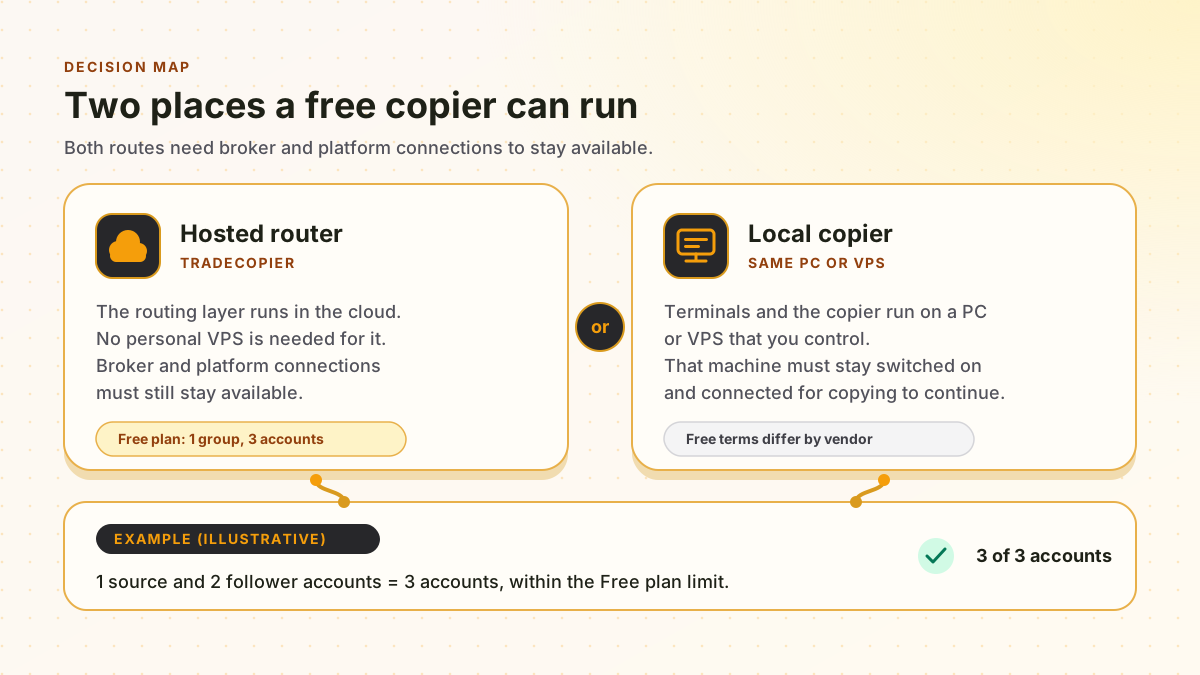
The diagram shows the first decision most people face. Broker and platform connections apply to both models, and the example is illustrative only.
Swipe the diagram sideways to read it at full size.
How to choose a free trade copier
Four questions decide most of the choice. Answer them for every route you plan to copy, not only for the first account.
Hosted or local
Pick a hosted router when you want the routing layer off your own machine. Pick a local copier when your terminals already run on a PC or VPS you control, and you accept that the machine must stay on.
What must stay connected
In both models, the broker connections on the source and follower side must stay live. Any terminal connector or authenticated session a route needs must stay available too. A hosted router does not remove those dependencies, and the requirements vary by route.
Free limits
Count every source and follower account. TradeCopier’s Free plan allows 3 accounts in total, so one source and two followers fit. A fourth account needs a paid plan. Check when any credit, beta or trial ends, and check the usage shown in your dashboard before you connect or change accounts.
Platforms
List every platform on both sides of each route. Check whether the self-service menu covers it or whether support must set it up. A platform marked beta may not be ready for a live account.
Test before you copy live money
Moving a working setup is where copying errors appear. These steps apply to any copier, hosted or local.
- Step 1
Write down each source and follower account: broker, platform, account type and symbol names.
- Step 2
Connect one route on a demo account, then map symbols, lot sizing and trade direction.
- Step 3
Test open, modify and close actions, then compare the copier’s activity with the broker’s orders, fills and open positions.
- Step 4
Keep the old copier running until the new route has matched several sessions of real activity.
Risk note
Copying does not remove trading risk. A copied position can lose money, losses can exceed expectations, and a wrong lot size or inverted direction copies the mistake to every follower. Nothing on this page is investment, legal or tax advice, and no copier guarantees profit or identical fills. Check each vendor’s terms and your broker’s rules before you connect an account, and test on a demo account first.
Related pages
Cloud trade copier
How hosted routing works and what must stay online.
Supported platforms
Which platforms are self-service and which need support.
Plans and limits
Free, Pro and Pro Plus limits and the current prices.
FX Blue alternative
A same-computer copier compared with a hosted router.
Best free trade copier guide
Cloud, local and demo options compared in one guide.
MT4 trade copier
MT4 setup, including the support-assisted route.
Duplikium alternative
Duplikium credit, pricing and hosting compared with dated sources.
Copiix alternative
A free local copier compared with a hosted router.
Social Trader Tools alternative
MT4 and MT5 cloud copier plans compared by account count.
Free cloud trade copier questions
Several products offer free terms, but they differ. TradeCopier’s Free plan is permanent within its limits: 1 trading group and 3 trading accounts in total, with no time limit. Duplikium gives a prepaid starting credit, and SnapCopier is free during its beta with no end date stated. Check each vendor’s current terms before you connect an account.
TradeCopier’s hosted router does not need a personal VPS. Broker and platform connections, and any connector a route requires, must still stay available. Local products work differently. FX Blue’s FAQ, as checked on 7 November 2026, says a VPS is not required to run its Personal Trade Copier. It also says that if you do not want to leave your home PC running to copy signals, you need a VPS instead.
TradeCopier supports MT4, MT5, cTrader, NinjaTrader 8, DXTrade, TradeLocker, MatchTrader and VertexFX. The self-service account menu currently shows MT5, cTrader and TradeLocker. For the other platforms, ask support for current setup instructions before you connect.
The Free plan includes 1 trading group and 3 trading accounts in total, with no time limit and no paid add-ons. Count both source and follower accounts. The pricing page lists the Pro and Pro Plus limits and the current prices.
No. Test any route on a demo account first, including open, modify and close actions, symbol mapping and lot sizing. Then reconcile the copier’s activity with your broker’s orders, fills and open positions. Trading carries a risk of loss, and no copier guarantees profit or identical fills.