Glossary · Last updated: 9 November 2026 · By TradeCopier Editorial Team
What Is MetaTrader 4? The Platform Explained
MetaTrader 4 (MT4) is a Forex trading platform made by the software company MetaQuotes. It gives you charts, a range of order types and automated trading programs. The broker is a separate party: it opens your trading account, runs the trade server and sets the prices you trade on.
Key takeaways
- MetaTrader 4 is software. MetaQuotes makes it and says it does not provide investment or brokerage services.
- Your broker opens the account, runs the trade server and sets the prices. Most account and funding questions go to the broker.
- MT4 and MT5 are separate MetaQuotes products. MetaQuotes says MT4 licences are no longer available for purchase and its development focus is MT5, so which one you can use depends on what your broker offers.
- On TradeCopier, MT4 is a supported platform. The connection is arranged with support, so confirm your exact pair before you rely on it.
- Trading carries a high risk of loss. A copier repeats orders at your own account size and does not guarantee a result.
MetaTrader 4 and MetaTrader 5 on TradeCopier
Both MetaTrader platforms are on the supported list. MT4 connections are arranged with support. MT5 appears in the self-service menu. The platforms page lists every supported platform and how each one is connected.
 MetaTrader 4
 MetaTrader 5
What MetaTrader 4 is and who runs it
MetaTrader 4 is a trading platform. The terminal shows prices, charts with indicators and the order types you can place. It also runs automated trading programs called Expert Advisors. MetaQuotes says the MetaTrader 4 platform is designed for Forex and futures trading.
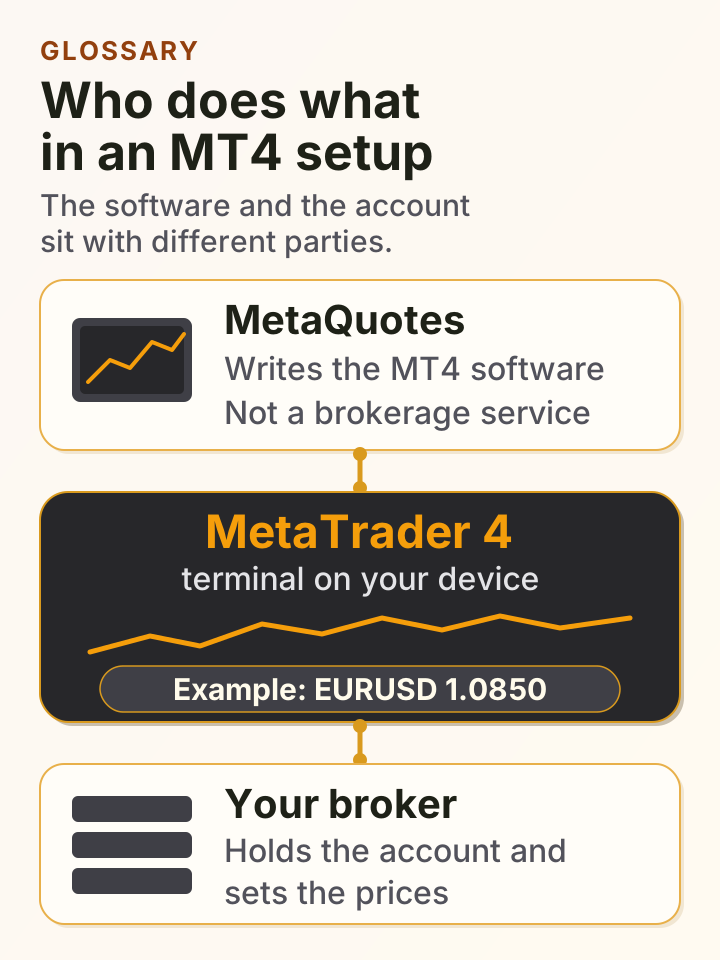
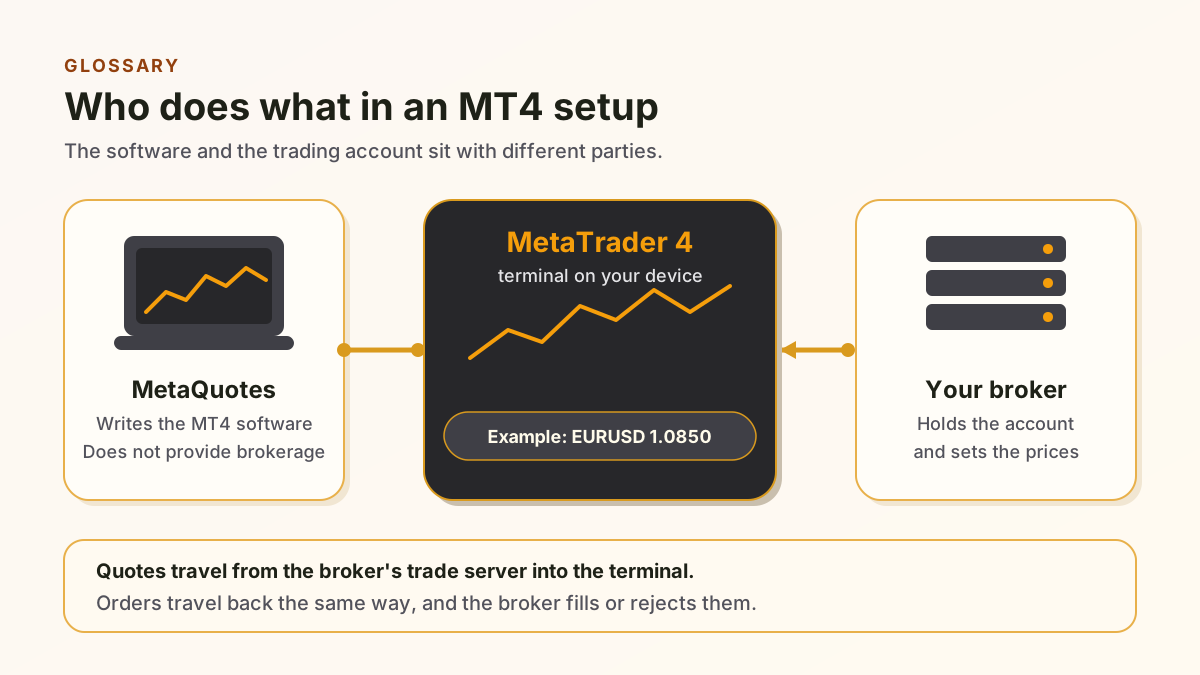
MetaQuotes is a software development company. Its own MetaTrader 4 page says it "does not provide investment or brokerage services". That sentence is the core of the distinction. MetaQuotes writes the software. The trading account, the balance, the trade server and the quoted prices belong to the broker you open an account with.
MetaQuotes' broker page for MetaTrader 4 says that 750 or more brokers and banks provide services to traders using the platform. It describes the broker side as trade servers, access points, manager terminals, gateways and data feeds. It also says account management, trade processing and quote transmission run inside MetaTrader 4 on that broker side. The same page says "The MetaTrader 4 trading platform licenses are no longer available for purchase." It adds that MetaQuotes now focuses its development on MetaTrader 5. Read the 750 figure together with that statement.
So the answer to "is MT4 a broker" is no. MT4 is the software a broker connects its clients to. Two traders can run the same MT4 build with different brokers and see different prices, spreads and execution. That difference is the broker's, not the platform's.
Who does what in an MT4 setup
The software and the account sit with different parties. The example below is illustrative only and shows no real account, price or result.
MetaTrader 4 vs your broker
Use this split when a support reply or an error message comes back. The first question is whether the fault sits in the software on your device or in the broker's account and server.
Who makes it
- MetaTrader 4
- MetaQuotes, a software development company
- Your broker
- Your chosen broker, a firm you open an account with
Trading account
- MetaTrader 4
- Not provided. The terminal logs in to an account the broker has opened
- Your broker
- Opens, holds and manages the account and its balance
Prices (quotes)
- MetaTrader 4
- Shows the prices its server sends to the terminal
- Your broker
- Sets and sends the prices from its trade server
Orders
- MetaTrader 4
- Lets you send and view orders on the terminal
- Your broker
- Accepts, fills, rejects or re-quotes each order on its server
Regulation and client funds
- MetaTrader 4
- Not a brokerage, by MetaQuotes' own statement
- Your broker
- Licence and client-fund rules vary by broker. Check its regulator and terms
Who to ask about a problem
- MetaTrader 4
- Install, updates and terminal behaviour
- Your broker
- Logins, server names, margin, order history and withdrawals
Sources: MetaQuotes MetaTrader 4 platform page, MetaTrader 4 for brokers and the MetaQuotes company statement, checked 9 November 2026. The broker column describes general broker roles, not one firm.
MT4 vs MT5 at a glance
MetaQuotes sells two separate platforms. The table uses only what its own pages state. Where a page does not say, the cell says so.
How MetaQuotes describes it
- MetaTrader 4
- Designed for Forex and futures tradingSource: MetaQuotes MT4 page, checked 9 November 2026
- MetaTrader 5
- A multi-asset platform for Forex, exchange instruments and futuresSource: MetaQuotes MT5 page, checked 9 November 2026
Software maker
- MetaTrader 4
- MetaQuotes, which says it does not provide brokerage servicesSource: MetaQuotes MT4 page, checked 9 November 2026
- MetaTrader 5
- MetaQuotes, which says it does not provide brokerage servicesSource: MetaQuotes MT5 page, checked 9 November 2026
Brokers using it
- MetaTrader 4
- 750 or more brokers and banks, per MetaQuotesSource: MetaQuotes MT4 brokers page, checked 9 November 2026
- MetaTrader 5
- Not stated on the MetaQuotes pages checked
Vendor development focus
- MetaTrader 4
- MetaQuotes says MT4 licences are no longer available for purchaseSource: MetaQuotes MT4 brokers page, checked 9 November 2026
- MetaTrader 5
- MetaQuotes says it focuses its development efforts hereSource: MetaQuotes MT4 brokers page, checked 9 November 2026
Which one you get
- MetaTrader 4
- Depends on your broker
- MetaTrader 5
- Depends on your broker
TradeCopier connection
- MetaTrader 4
- Support-assisted. See the MT4 trade copier page
- MetaTrader 5
- Self-service in the connection menu. See the platforms page
The TradeCopier row reflects the connection menu checked on 24 September 2026. A platform appearing on the list does not confirm a specific route. Ask support.
Where a trade copier fits in an MT4 setup
A trade copier reads orders from a source account and places matching orders on a follower account. It does not replace the broker. The copied trade still fills at your broker, at the broker's price, on the follower's trade server. A copier can only pass on what the broker accepts.
On TradeCopier, MT4 is a supported platform. The connection is arranged with support rather than picked in the self-service menu. The MT4 trade copier page explains the setup steps and the Free plan limits, and the platforms page shows how each platform is connected.
Hosting is a separate question. The TradeCopier router is hosted, so it does not need a personal VPS. Your broker connections and any connector your route needs still have to stay available. For a wider view of hosted routing, read the cloud trade copier page.
If your follower is on MT5 and your source is on MT4, the direction has its own instrument, quantity and order-action checks. The MT4 vs MT5 comparison covers the choice between the two copier routes.
Checks before you use MT4 with a copier
These checks come from the broker side of the setup. Do them before you connect a funded account.
- Confirm the trade server name for each MT4 login in your broker's own terminal. A wrong server name is a common cause of a failed login.
- Ask the broker which symbol names it uses. A copied order needs the same instrument name on both accounts, so a suffix or prefix difference can block a trade.
- Check that the broker allows the order types and lot sizes your source account uses. Minimum and maximum lot rules differ by broker.
- Keep every connection and any connector your route needs available. Ask support which parts apply to your pair.
- Keep the broker's rejection text for any failed order, along with the ticket number. It is the first thing support will ask for.
- Test with a small size on a demo or low-risk account before you scale up.
Risk note
Forex and futures trading carries a high risk of loss. A copier repeats trades, so it repeats losses as well as gains, and it cannot promise a fill or a result. Leverage can increase losses quickly. Only trade money you can afford to lose, and confirm your broker's regulator, licence and terms before you fund an account. Nothing on this page is investment advice.
Related pages
MT4 Trade Copier: Setup Steps, Limits and Route Checks
Setup steps and Free plan limits for hosted MT4 copying, with support-assisted connections.
Trade Copier Platforms | MT4, MT5, NinjaTrader & More
The eight supported platforms, with which ones are self-service and which are support-assisted.
Cloud Based Trade Copier: Hosted Routing | TradeCopier
What the hosted router needs, and what still has to stay connected.
MT4 vs MT5: Which Trade Copier is Better?
A comparison of the MT4 and MT5 copier routes for prop firm and multi-account use.
TradeCopier Pricing | Free, Pro $35/mo or $348/yr
Plan limits for groups and accounts on Free, Pro and Pro Plus.
MetaTrader 4 questions
No. MetaQuotes, which makes MetaTrader 4, says it is a software development company and does not provide investment or brokerage services. Your broker provides the trading account, the trade server and the prices.
MetaQuotes makes MetaTrader 4. Its broker page says 750 or more brokers and banks provide services to traders using the platform. The same page says MT4 licences are no longer available for purchase and that development now focuses on MetaTrader 5.
No. MetaQuotes describes MetaTrader 4 as designed for Forex and futures trading and MetaTrader 5 as a multi-asset platform for Forex, exchange instruments and futures. Your broker decides which one it offers you.
MetaQuotes says you can download MetaTrader 4 and open a demo account for free. Ask your broker which demo server it offers before you rely on any test.
Yes. MT4 is on the supported platform list, and its connection is arranged with support. Ask support to confirm your exact source and follower pair before you rely on the route.
MetaQuotes facts come from its own MetaTrader 4 and MetaTrader 5 pages and its MetaTrader 4 broker page, checked 9 November 2026. TradeCopier facts come from the TradeCopier pricing and platforms pages in this repository.