Free
Permanent within limits
1 trading group and 3 total accounts, with no time limit.
Platform guide · Last updated: 7 November 2026
An MT4 trade copier copies trades from a source MetaTrader 4 account to one or more follower accounts. TradeCopier hosts its routing layer in the cloud, and MT4 connections are set up with support, so ask support for the MT4 connection steps before you start a live route.
A MetaTrader 4 trade copier watches a source account for trading activity and sends matching instructions to a follower account. The follower then places or manages its own orders with its own broker.
A copier does not move money between accounts, and it does not make a follower trade identical to the source. Each broker decides the fill price, the lot step, the contract size and whether an order is accepted. That is why the same instruction can produce a different position on two accounts.
On MT4, the copier follows the same pattern: one source account, one or more follower accounts, and checks on each broker. The questions that matter most are the symbol names on each broker, the quantity rules and how the route handles changes to a source trade, such as a modification, a partial close or a full close. Write these down before you create a trading group.
Use these steps for an MT4 source and an MT4 follower. Support provides the connection itself, so treat this list as a preparation checklist, not a self-service guide.
For each account, write down the broker name, the trade server name and whether the account will be a source or a follower. Keep passwords out of notes, screenshots and support messages.
Request the current MT4 connection steps and confirm that your source and follower pair is supported. A platform appearing on the supported list does not by itself confirm your exact route.
Follow the steps support provides for each terminal. If your accounts appear in your dashboard, check that each has the role you intended before you create a trading group.
Match each source symbol to its follower symbol. Ask each broker how it records positions, then compare contract size, price digits, minimum lot step and rounding. One lot on one broker is not automatically one lot on another. Example with illustrative numbers: a source trade of 1.00 lot with a follower multiplier of 0.50 asks for 0.50 lot; if the follower broker uses 10,000 units per lot instead of 100,000, that 0.50 lot is a much smaller exposure, so check both specifications before you set the multiplier.
Open, modify and close a small test position on a demo or small account. Check the activity log against the broker’s own orders, fills and positions, and treat any difference as unresolved until you have explained it.
Write down the results of the controlled test, including any action the route did not handle, before you increase size or enable a live trading group.
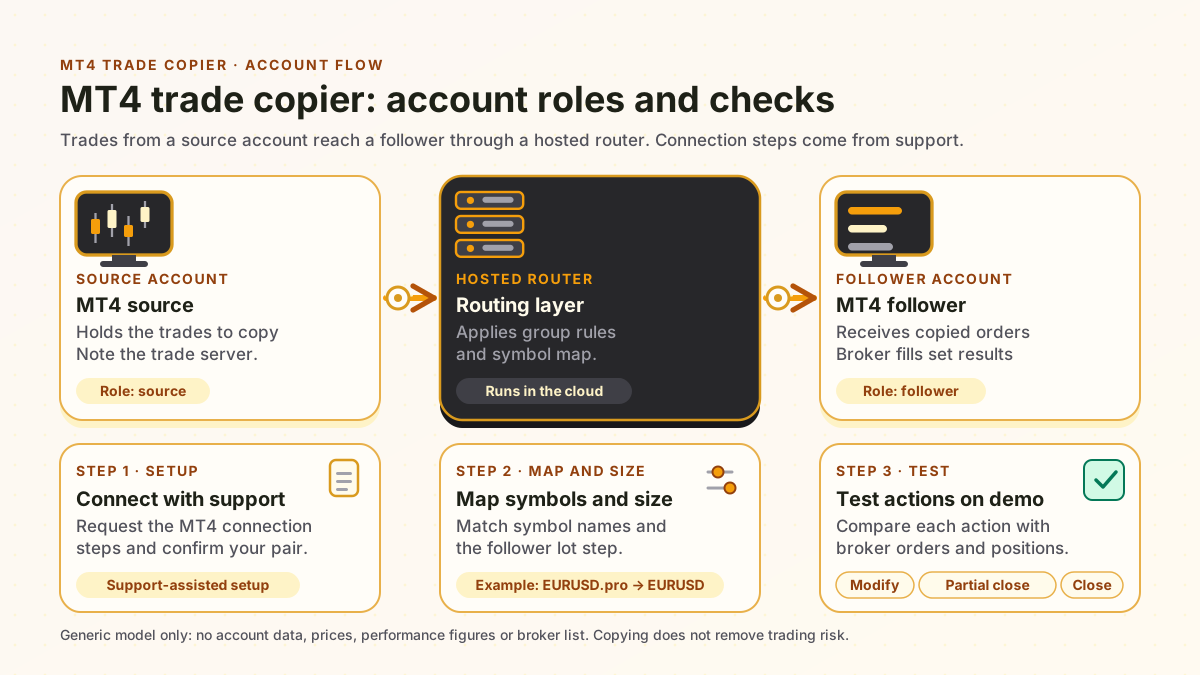
Source account
MT4 source. Holds the trades to copy. Trade server noted. Role: source.
Hosted router
Applies group rules and the symbol map. Runs in the cloud.
Follower account
MT4 follower. Receives copied orders. Broker fills set the results. Role: follower.
Check 1
Connect with support
Request the MT4 connection steps and confirm the pair. Support-assisted setup.
Check 2
Map symbols and size
Match symbol names and the follower lot step. Example: EURUSD.pro → EURUSD.
Check 3
Test actions on demo
Compare each modify, partial close and close with broker orders and positions.
An MT4 source with an MT5 follower has different instrument, quantity and order-action checks from an MT4 to MT4 route.
For that direction, read the MT4-to-MT5 copying guide. It covers account details, symbol mapping and a controlled test. Its checks do not transfer automatically to the reverse direction.
For the platforms that appear in the self-service account menu, see the supported platforms page.
The table compares three generic ways to run a copier. It does not name or rank any other product.
Copier run options, described as of 7 November 2026; no competitor or vendor source is cited. Swipe sideways to read the full table.
| Question | Hosted cloud copier | Local EA on your computer | EA on a personal VPS |
|---|---|---|---|
| Where the copy logic runs | Hosted routing layer in the cloud | Terminal on your own computer | Terminal on a rented server |
| Needs your computer online | Not for the router. Ask support which MT4 connection or component your route uses, and keep broker connections reachable | Yes, for as long as copying should continue | No, but the server and its software must stay online |
| Personal VPS needed | Not for the router | Not applicable | Yes, and you rent, configure and maintain it |
| Setup effort | Dashboard setup, with MT4 connection steps from support | Install and configure each terminal yourself | Set up the server, the terminals and remote access |
| Who maintains the software | TradeCopier maintains the hosted router | You maintain the computer and terminals | You maintain the server, the terminals and updates |
| Risk that remains | Broker, platform and trading risk | Broker, platform and trading risk | Broker, platform and trading risk |
A local EA or a VPS can suit one computer or server that you control and keep running. A hosted router suits copying that should not depend on one computer staying on. None of the three removes broker or trading risk. The hosted column describes TradeCopier; the other two columns are general descriptions.
This page does not publish a broker list. A broker name does not establish that a route works for your accounts, so check your own setup.
Prices and limits as of 7 November 2026. Check the current terms on the pricing page before you pay, because they can change.
Permanent within limits
1 trading group and 3 total accounts, with no time limit.
$35 billed monthly, or $348 billed yearly
5 trading groups and 15 total accounts.
$100 billed monthly, or $912 billed yearly
20 trading groups and 60 total accounts.
Paid plans add $2 per additional account. The billing period for that add-on is still being confirmed, so check the final total before you pay. Source and follower accounts both count toward your limit.
Copying trades does not remove trading risk. A copied position can lose money, and losses can be larger than expected, especially with leverage, price gaps or slippage. A copier can also miss, delay or duplicate an instruction when a connection drops. Test on a demo account first. This page is general product information, not investment, financial or legal advice.
MT4 is a supported platform, and its connection is set up with support rather than self-service. Ask support to confirm that your exact MT4-to-MT4 source and follower pair is supported before you rely on the route.
You do not need a personal VPS for TradeCopier’s hosted routing layer. Your broker and platform connections, and any terminal connector your route requires, still need to keep running. Confirm where each one runs before you switch off a computer or server.
The Free plan is permanent within its limits: one trading group and three total accounts, with no time limit. Count both source and follower accounts, and check the account-counting rules for your setup before you connect.
No. An MT4 source with an MT5 follower has its own instrument, quantity and order-action checks. Read the MT4-to-MT5 guide for that direction, and ask support to confirm the exact route before you test it.
Check the activity log, which can record broker responses and fill status, against the broker’s own orders, fills and positions before you rely on a copied action. Treat any difference as unresolved.
The eight platforms TradeCopier lists, and which connections are self-service.
How the hosted router works and what must stay online.
Free, Pro and Pro Plus group and account limits.
Instrument, quantity and order-action checks for other routes.
Create an account and start with the Free plan.
The platform explained, and what the broker provides.
What the rejection means for a copied order.
Last updated: 7 November 2026 · By TradeCopier Editorial Team

Connect supported accounts with configurable sizing, risk controls, activity logs, and alerts.