guide · Platforms & automation
TradingView Alerts and Webhooks: An Auditable Workflow
A TradingView alert observes a configured condition; a webhook sends its message to an external receiver. Delivery, validation, order acceptance and a broker fill are separate events that need separate evidence.

Separate the stages of the workflow
A useful audit begins with distinct stages: input data arrives, a condition evaluates, an alert fires, a request is delivered, a receiver validates it, an order is submitted, a broker responds and fills change a position. One timestamp or a green delivery indicator cannot prove that every later stage succeeded.
TradingView describes alerts on data series, drawings, indicators and strategies. A webhook is one delivery mechanism for an alert message. The receiving system determines what that message means. A charting platform's ability to send a message does not establish that every broker, account or copier can interpret it as an order.
Before configuring anything operational, write down the exact receiver and its supported message contract. This guide supplies an educational workflow and a sample event format. It does not document a native TradeCopier webhook receiver or claim that TradeCopier can execute arbitrary TradingView strategies.
Freeze the condition and alert version
Record the symbol, exchange or broker feed, chart timeframe, session template, indicator settings and event frequency. A crossing on one provider's price series may not occur at the same time on another. A confirmed-bar condition is also different from one evaluated on every update of an unfinished bar.
TradingView's Pine documentation explains script alerts and their saved configuration. A running alert is not simply a permanent live link to whatever settings happen to be visible on a chart later. Keep a version identifier in the operating record and verify whether changing the script or inputs requires recreating the alert.
For an illustrative moving-average event, state whether a crossing requires the completed close. If the fast line moves above the slow line intrabar and falls back before close, the intrabar and confirmed-bar variants should report different events. Treat that as a design choice to test, not automatically a platform malfunction.
What TradingView documents about delivery and resends
The webhook configuration documentation, checked September 22, 2026, describes HTTP POST delivery: valid JSON uses application/json and other text uses text/plain. It requires two-factor authentication, accepts ports 80 and 443, excludes IPv6 and cancels a request when processing exceeds three seconds. Check the alert log's webhook status; delivery can fail.
Its separate resubmission policy says a response in the 500–599 range, except 504, triggers a resend after five seconds, with at most three resends: four sends including the original. This does not establish retries for every timeout, 4xx response or lost request. A timeout is ambiguous because the receiver may have committed a record before the response was lost.
TradingView documents HTTPS client-certificate verification configured by the recipient. A receiver must validate the certificate through its actual TLS/proxy setup; reading an untrusted body field or forwarded header is insufficient. No invented signature header or shared-secret field is supplied here. Keep passwords and broker credentials out of alert bodies. The example below demonstrates message validation, not a complete authentication implementation.
A versioned, record-only JSON example
The downloadable contract is an original educational schema, not TradingView's universal format or a TradeCopier API. It only records a fictional observation. Even a valid message cannot place an order. Version 2 expands this guide's earlier minimal version-1 example; a version-2 receiver must reject version 1 rather than silently reinterpret it.
{
  "schema_version": 2,
  "mode": "record_only",
  "event_id": "demo-alert-0001",
  "strategy_version": "demo-v1",
  "stream_id": "demo-stream-A",
  "sequence": 1,
  "event_time_utc": "2026-09-22T12:00:00Z",
  "valid_until_utc": "2026-09-22T12:02:00Z",
  "condition": "bar_close_above_demo_threshold",
  "symbol_reference": "DEMO:INSTRUMENT_A",
  "quantity": {
    "value": "2.50",
    "unit": "units"
  }
}
Download the version-2 JSON Schema, sample payload, validation fixtures and recovery scenarios. These are static learning files, with no endpoint, credentials or execution code.
To reproduce the offline checks, save the Python verifier beside the three JSON downloads. With Python 3.10 or newer, install the pinned validation dependency, then run the verifier. Dependency installation requires network access; the verifier itself reads bounded local files and sends no requests or orders.
python -m pip install "jsonschema[format]==4.26.0"
python verify-trading-webhook-offline.py
It checks the published schema, calendar-valid timestamps, parser rejection cases, fingerprints and retry-budget examples. It does not implement a database, receiver, authentication, queue or broker connector, and it cannot prove their behavior.
| Field | Type and validation | Meaning |
|---|---|---|
| schema_version / mode | Integer 2 / string record_only | Reject unsupported versions and any execution mode. |
| event_id / stream_id | 1–64 ASCII letters, digits, dot, underscore, colon or hyphen; first character alphanumeric | Stable event identity and a configured sequence namespace. Retries retain the same identity. |
| strategy_version | Same identifier alphabet, 1–32 characters | Saved condition/settings revision, not the receiver's software version. |
| sequence | Integer 1–2147483647 | Increasing observation number within one stream. |
| event_time_utc / valid_until_utc | Calendar-valid UTC timestamp ending Z, to whole seconds | Producer event time and exclusive expiry, checked against receiver time. |
| condition / symbol_reference | One of the two demo threshold labels / 1–64-character identifier | A fictional condition and instrument reference; neither establishes broker mapping. |
| quantity.value / quantity.unit | Positive decimal string, at most 12 whole and 8 fractional digits / contracts, lots or units | Observation quantity with explicit units. No signs, exponent, commas, excess leading zeros or implicit conversion. |
The example value "2.50" is a string to preserve decimal text in transport; use decimal-aware parsing for arithmetic. It does not mean 2.50 lots when unit is units. Zero, "NaN", "1e3" and numeric 2.50 are rejected. Both objects are closed to unknown fields. Configure JSON Schema Draft 2020-12 validation with date-time format checking: some validators treat format as annotation unless explicitly enabled. Cross-field time comparisons, decimal arithmetic, authorization and stored-state checks are separate from schema validation.
For an actual adapter, a symbol may identify a continuous chart, expiry, CFD or broker alias. Quantity minima, maxima and steps require a verified account specification. One buy observation could imply adding, closing or reversing depending on state, so no such translation is inferred here. The orders, deals and positions reference separates requested actions from actual executions.
Deduplicate with durable identity, fingerprints and states
Scope each event ID to its authenticated receiver context and stream. Retrying the same observation must reuse its event ID; generating a new random ID per attempt defeats deduplication. A new observation requires a new ID and sequence. Do not reuse a whole-day identifier or edit the quantity under an old ID.
Reject duplicate JSON member names before a normal parser can discard them. After schema validation, this example normalizes schema_version and sequence to integers, recursively sorts object keys in ASCII order, serializes all schema fields as compact JSON encoded in UTF-8, and calculates SHA-256. String values remain unchanged: quantity "2.50" and "2.5" have different fingerprints even though their decimal values are equal. Key reordering and insignificant JSON whitespace do not change the fingerprint. Store this convention as fingerprint-v1 with the original validated record. This limited recipe is not RFC 8785 or a universal canonicalization standard. A fingerprint compares content; it does not authenticate its sender.
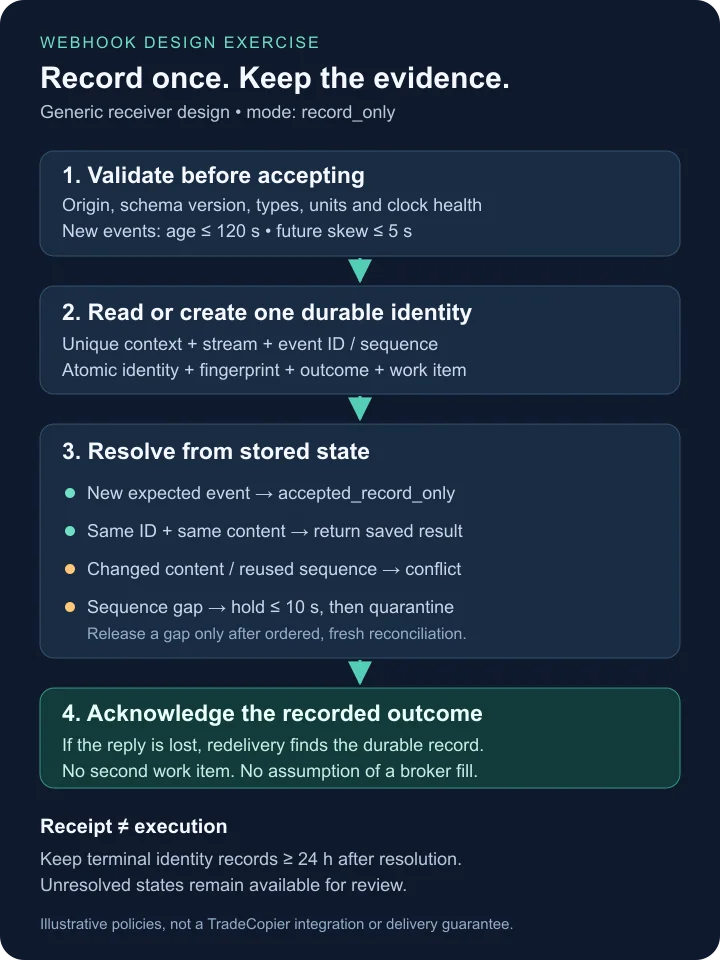
Within the authenticated context, check an existing identity before applying new-event age rules. An unchanged, schema-valid duplicate returns the saved receipt read-only, even after expiry; it never recreates work. Changed content under the same identity remains a conflict. For a genuinely new event, apply freshness, configured-stream and sequence checks. In one database transaction, insert the event under a unique context/stream/event-ID constraint, reserve context/stream/sequence, and store the initial state plus a durable work item if later processing is needed. A read-then-write cache check can race when two requests arrive together. Commit before acknowledging durable receipt. If the commit result is unknown, query the same unique key before attempting another insert.
| Observation | Recorded decision |
|---|---|
| New valid ID and expected sequence | Commit accepted_record_only; acknowledge receipt without claiming execution. |
| Same ID and same fingerprint | Return its stored outcome; increment delivery-attempt evidence, without another work item. |
| Same ID, changed content | Record conflict and preserve the original; do not overwrite or reprocess. |
| Same sequence, different event ID | Quarantine a sequence conflict for review. |
| Valid event beyond a sequence gap | Commit held_gap and a deadline; acknowledge the durable hold, not acceptance into the sequence. |
| New expired event, unsupported version or malformed input | Record a rejection reason with appropriate bounded diagnostics; never convert it into an executable instruction. |
RECORD-ONLY DESIGN PSEUDOCODE — no network endpoint or orders
verify_origin_and_configured_context(request)
event = parse_json_rejecting_duplicate_members(request.body)
validate_schema_v2_with_date_time_formats(event)
fingerprint = fingerprint_v1(event)
begin transaction, serializing this configured stream
  prior = find(context, event.stream_id, event.event_id)
  if prior exists:
    if prior.fingerprint != fingerprint: record conflict
    else: read prior outcome; create no work
  else:
    check freshness and stream registration
    check sequence uniqueness and expected position
    store accepted_record_only, held_gap or rejection
    store any required durable work item atomically
commit transaction
acknowledge only the outcome that was durably committed
This is a design to implement and test separately. Database uniqueness must still protect races; a conflict at commit is resolved by rereading the durable identity, not by overwriting it. Rejections with a usable validated identity can have durable outcomes; malformed input needs bounded diagnostic evidence without an untrusted identity becoming an authorized stream.
For this exercise, retain terminal deduplication keys and outcomes for at least 24 hours after terminal resolution, longer than the declared replay window; unresolved held/conflict states do not expire automatically. This is a receiver design choice, not a TradingView guarantee. Store the stream high-water mark durably as well. Deleting a cache key is not permission to replay a day-old event: expiry and sequence rules still reject it. An archive review must explicitly authorize a new related record when appropriate.
Keep sender resends separate from local recovery
A 2xx acknowledgment means the receiver durably recorded the declared outcome, not that an order filled. Finish this bounded ingestion step within TradingView's documented timeout; perform slow analysis separately. If storage is unavailable before commit, a temporary server failure may invoke the documented sender resend policy. Do not return success before saving work, or deliberately use endless failure responses as a queue.
A separate illustrative worker budget permits one initial local attempt plus three retries, waiting 1, 2 and 4 seconds plus independently chosen 0–250 ms jitter before each retry. Base waiting totals seven seconds and at most 7.75 seconds with jitter. All processing and waiting must fit a 15-second elapsed deadline measured with a monotonic clock, and finish before the event's expiry. The downloadable exercise allows at most two seconds per local attempt; stop before starting an attempt whose full timeout cannot fit the remaining budget. Four full two-second attempts plus maximum waits would take 15.75 seconds, so the 15-second cap can prevent the fourth attempt. Exhaustion records retry_exhausted for review. These timings are our example policy, not TradingView's five-second resend schedule.
The offline retry planner permits only a confirmed transient_no_commit outcome; an unknown commit result returns a reconciliation decision instead of another attempt. Only retry a classified transient operation whose identity and previous result can be checked. Invalid schema, unknown units and conflicts need correction, not backoff. A receiver restart after commit but before acknowledgment must find the durable row and return the saved result on redelivery. Where a separately implemented execution service loses a broker response, reconcile broker order and fill identifiers first: a local processed flag or an HTTP timeout cannot establish that no order exists.
Use sequence gaps and timestamps as separate checks
For the worked policy, require event_time_utc < valid_until_utc ≤ event_time_utc + 120 seconds. Reject an event more than 120 seconds old, more than five seconds in the future, or received at or after valid_until_utc. The clocks must be synchronized and clock-health failures must be surfaced. UTC formatting alone does not prove clock accuracy. For the sample event at 12:00:00 with expiry 12:02:00, receipt at 12:00:04 is timely; receipt at 12:02:00 is expired. A receiver clock reading 11:59:54 gives six seconds of apparent future skew and fails this policy.
Provision a stream with its known starting sequence; in this exercise a new authorized stream begins at 1. Do not reset a counter silently after a producer restart. Create a new explicitly configured stream or recover the old sequence from durable state. The counter must be produced reliably by the actual implementation; this template does not establish that every TradingView alert supplies one automatically.
Suppose the last contiguous sequence is 100. Event 102 arrives at 12:00:04, so persist held_gap and keep the high-water mark at 100. Event 101 arrives at 12:00:07: recheck both events' freshness and context, record 101, then release 102 in the same ordered reconciliation process. If 101 has not arrived by 12:00:14, the illustrative ten-second gap deadline expires; quarantine 102 and keep the stream paused for review. A late 101 cannot silently unpause it. Reconcile producer logs and receiver records, recording whether an event was absent, delayed or invalid; do not fabricate the missing observation or assume its intended position.
Sequence establishes order within a stream, while timestamp checks bound age and skew. Neither alone guarantees complete delivery. Measure received, accepted, held, rejected and duplicate counts separately. If an operational system later submits orders, keep submission, broker acceptance, partial fills and final positions as additional evidence. An invented timeline of evaluation at 09:45:00.000, firing at .040, receipt at .180 and validation at .190 illustrates stages only; it is not a TradeCopier or TradingView latency benchmark.
Rehearse failure boundaries before integration
Test the downloaded fixtures with an offline validator, then use a separately implemented record-only receiver to exercise simultaneous duplicates, changed payloads under one ID, schema-version mismatch, expired events, sequence conflicts and missing sequence numbers. Stop it after commit but before acknowledgment; the same record should survive restart. Stop a worker after claiming a task; recovery must respect its lease, durable outcome and retry budget without creating a second work item.
A working schema test does not prove transport authentication, reliable event generation, broker compatibility or execution. Any later simulation needs the exact connector's documented contract and permission model. Paper trading differs from live execution in liquidity and fill assumptions. Preserve the rejected original when issuing a corrected, explicitly related event rather than rewriting history.
Investigate chart and alert disagreements
A final historical chart may differ from the values visible during an unfinished bar. TradingView documents repainting-related differences. Compare the original alert version, actual input series and decision timestamp before assuming that the receiver missed an event.
For a moving-average crossover, preserve the two numeric series at the decision time. For an execution discrepancy, compare order and fill records instead of recalculating the indicator from today's adjusted chart. These are separate investigations and need different evidence.
A completed operational review should answer four concrete questions: what condition fired, what message arrived, what authorized action was accepted and what position resulted? Use the slippage calculator only after choosing a valid reference price and actual fills. This makes the workflow auditable without mistaking a delivered notification for a successful or profitable trade.
Questions and answers
Does a delivered webhook prove that a trade executed?
No. Delivery and a durable acknowledgment show only the receiving outcome. Validation, submission, broker acceptance, fills and the final position require their own records.
Does editing a chart automatically update a running script alert?
No. TradingView script alerts use a saved snapshot of the script and settings. Verify the active version and recreate alerts when the platform workflow requires it.
When does TradingView resend a webhook?
The documentation checked September 22, 2026 describes a five-second resend after HTTP 500–599 responses except 504, with at most three resends. It does not promise retries for every timeout or other failure.
What should a receiver do with the same event ID twice?
Look up the durable record within its authenticated context and stream. An identical fingerprint returns the stored outcome; changed content under that ID is a conflict, not a new instruction.
How long should webhook deduplication records last?
Retention must cover the declared replay and recovery window. This educational policy keeps terminal keys for at least 24 hours after resolution and retains unresolved states; deleting a key never bypasses expiry or sequence checks.
Does JSON Schema validate event freshness and sequence order?
No. The supplied schema validates structure and formats with an appropriately configured validator. Receiver-time comparisons, cross-field expiry rules, authentication, deduplication and sequence state need separate checks.
What should happen when sequence 102 arrives before 101?
With the last contiguous sequence at 100, this example holds 102 for up to ten seconds without advancing the stream. Timely arrival of 101 permits ordered reconciliation; otherwise the stream is quarantined for review.
Does this guide establish a TradeCopier TradingView webhook integration?
No. The downloads describe a generic record-only educational contract, not a TradeCopier endpoint or executable integration. Exact receiver and connector compatibility must be established independently.
Sources and further checks
Use the current source for your exact instrument, account and platform. Referencing a general specification does not establish support for every TradeCopier workflow.
- TradingView: Configure webhook alerts · Checked September 22, 2026
- TradingView: Set up alerts · Checked September 19, 2026
- TradingView Pine Script: Alerts · Checked September 22, 2026
- TradingView: Repainting behavior · Checked September 19, 2026
- TradingView: Webhook resubmission · Checked September 22, 2026
- TradingView: Webhook authentication · Checked September 22, 2026
Found an error? Send a correction with this page's address and a primary source. See our editorial standards for how we handle examples, claims and revisions.