How to Copy Trades from MT4 to MT5:
Setup and Test Checklist
To copy trades from MT4 to MT5, confirm the MT4 source and MT5 follower route, obtain its connection instructions, map equivalent instruments, configure sizing and reconcile a controlled test against destination orders, fills and positions. MT4 and MT5 do not automatically synchronize because they share a broker or owner.
TradeCopier supports MT4, MT5, cTrader, NinjaTrader 8, DXTrade, TradeLocker, MatchTrader and VertexFX. The current TradeCopier self-service app did not show an MT4 connection choice in the September 24 review, which did not verify a TradeCopier MT4-to-MT5 route. Request current MT4 setup instructions and account-pair confirmation from support; the inspection does not rule out an assisted connection.
Publisher disclosure: TradeCopier publishes this guide about its own product. MetaQuotes references explain platform mechanics; the examples are fictional verification exercises, not recorded executions or benchmarks. This guide covers MT4 source to MT5 follower. The reverse and same-platform directions need their own checks; enabling both directions requires an explicit loop-prevention design.
Start your MT4-to-MT5 setup with a clear account brief
Create a TradeCopier account and request the current MT4 connection instructions. Include the source as MT4 and the follower as MT5, both broker server names, demo or live status, the MT5 netting or hedging mode and the instruments you intend to copy. Ask which connector must remain available and which opening, closing and modification actions are supported for that pair. Share account aliases for planning; do not send account passwords or authentication tokens in the request.
The permanent Free plan includes one trading group and three total connected accounts. A proposed one-source, one-follower test uses two accounts; the plan capacity does not itself verify the MT4-to-MT5 connection. Confirm the route first, then use the worksheet below to record a small permitted test before adding followers. Paid plans provide more capacity with monthly or annual billing.
Use this sequence for the first run: confirm the account pair and connection requirements, map one instrument, calculate the follower quantity, run one permitted controlled opening and closing test, then reconcile the destination result. Continue with the additional order actions below only when the preceding result is understood.
Choose a cross-platform bridge, not a same-platform Signals subscription
MetaQuotes operates the built-in MQL5 Signals service. Its Signals rules, section IV.5, restrict an MT4 account to subscriptions in the MT4 section and an MT5 account to subscriptions in the MT5 section. That service is not a native MT4-to-MT5 subscription bridge. A separate cross-platform copier has its own supported routes and connection requirements.
TradeCopier's current cross-platform feature and platform page describe MT5, TradeLocker and cTrader as the observed self-service account choices. TradeCopier supports MT4, although it was not visible in that inspected menu. Those pages do not demonstrate the exact MT4-to-MT5 account route or its runtime requirements. The menu alone cannot exclude an assisted or private setup. If this direction matters to you, request the current MT4 connector, broker and account-mode requirements and a demonstrated source-to-follower test before treating the route as available.
1. Record the source, follower and connection dependencies
First obtain confirmation that the selected copier offers an MT4 source to MT5 follower connection for your broker and account pair. If it does, start a route record with an MT4 source alias and an MT5 follower alias. Record broker and server, platform build, account type, destination netting or hedging mode, the intended instruments and the order actions you use. Verify that the broker or account provider permits this account relationship. A successful technical connection does not establish permission.
Use account aliases in the blank MT4-to-MT5 route-check CSV. Keep passwords and authentication tokens out of this worksheet. Record the current connection instructions and which component must stay available. The download starts with eight proposed checks, all marked not_run; blank observation fields do not mean a passed test. Use the connection reference to record the platform build and configuration used. TradeCopier hosts its routing layer for current supported connections, and supports MT4. Hosting alone does not show whether a specific MT4 connector, terminal or other component must remain online. Obtain instructions for the confirmed route before installing software or renting a VPS. The cloud connection-record guide helps record dependencies without asserting that every named platform is connected.
Begin with a permitted demo or simulated route where available, using a deliberately small test quantity. Do not assume its execution conditions reproduce live trading. Test each material change to the broker, account mode, instrument specification or sizing configuration again.
2. Match the instrument before copying the lot number
Symbol mapping can associate names such as EURUSD and EURUSD.a. Matching the text is insufficient: check the underlying instrument, contract size, price units, quote currency, minimum volume, maximum volume and volume step on both accounts. Similar-looking symbols can describe different exposure.
The MQL4 symbol reference documents lot size and permitted lot increments. The MQL5 symbol reference documents destination contract size and volume limits, plus execution, filling and order properties. Obtain actual values from the accounts being connected. These references describe platform fields, not TradeCopier's sizing algorithm.
| Field | MT4 source | MT5 follower |
|---|---|---|
| Underlying | Same fictional currency pair | Same fictional currency pair |
| Contract size | 100,000 base units per lot | 10,000 base units per lot |
| Quantity | 0.20 lot | 2.00 lots for equal base units |
| Base-unit amount | 20,000 | 20,000 |
For this intentionally simplified example, equal base-unit amount requires 0.20 × 100,000 ÷ 10,000 = 2.00 destination lots. Copying the number 0.20 unchanged would produce only 2,000 base units on the follower. This calculation assumes genuinely equivalent contracts and is not a universal risk formula for CFDs, futures, inverse contracts or unlike instruments.
If the selected sizing rule instead targets half that base-unit amount, the illustrative result is 1.00 destination lot. Check the destination's minimum, maximum and step before submission. Equal base units still do not imply equal loss risk, margin, financing, spreads or fill price. Stop distance, account currency and contract terms matter. For broader instrument scope, see the Forex and Futures product overview.
3. Write the intended MT5 state before sending the event
An MT4 source ticket is not a universal destination position identifier. Keep the source event and destination order, deal and position references separate. MetaQuotes' MT5 trading principles distinguish instructions, executions and positions. MT5 netting uses one position per symbol, while hedging can retain separate positions.
The matrix below is an original planning exercise. It assumes equivalent contracts, a 1:1 quantity rule, supported actions and full fills; quantities are separate from the different-contract-size example above. Record the real expected behavior before testing. Existing unrelated positions can change the outcome.
| MT4 event | Expected MT5 check | Evidence to retain |
|---|---|---|
| Open a 0.20-lot buy from flat | Intended 0.20-lot long exposure after execution | Submitted quantity, all fills and resulting position |
| Open a separate 0.10-lot sell while that buy remains | Netting: 0.10 long. Hedging: separate 0.20 long and 0.10 short if treated as a new opening instruction | Account mode, instruction identity and both position snapshots |
| Partially close 0.05 lot of a 0.20-lot buy in a separate test | Targeted exposure falls to 0.15 long after the close fills | Source close event and intended destination position association |
| Change stop-loss or take-profit | Supported change reaches the intended destination position with valid price levels | Before and after protection values plus response |
| Place, then cancel, a pending source order | Determine whether the route copies pending instructions or only their later executions; verify cancellation behavior if supported | Policy, working orders, cancellation result and any fills |
| Close a sole source trade fully in a separate isolated test | With no other source trades or destination exposure, the intended destination position reaches zero after all relevant executions | Orders, linked deals and remaining positions |
A separate sell entry and a targeted partial close are different intentions even when net exposure changes by the same amount. MQL4's OrderClose reference identifies both the order ticket and quantity to close. The bridge needs an association with the intended destination state. On a netting follower, several source trades can contribute to one position; verify how a source-specific close or protection change is handled.
4. Reconcile the result rather than counting success messages
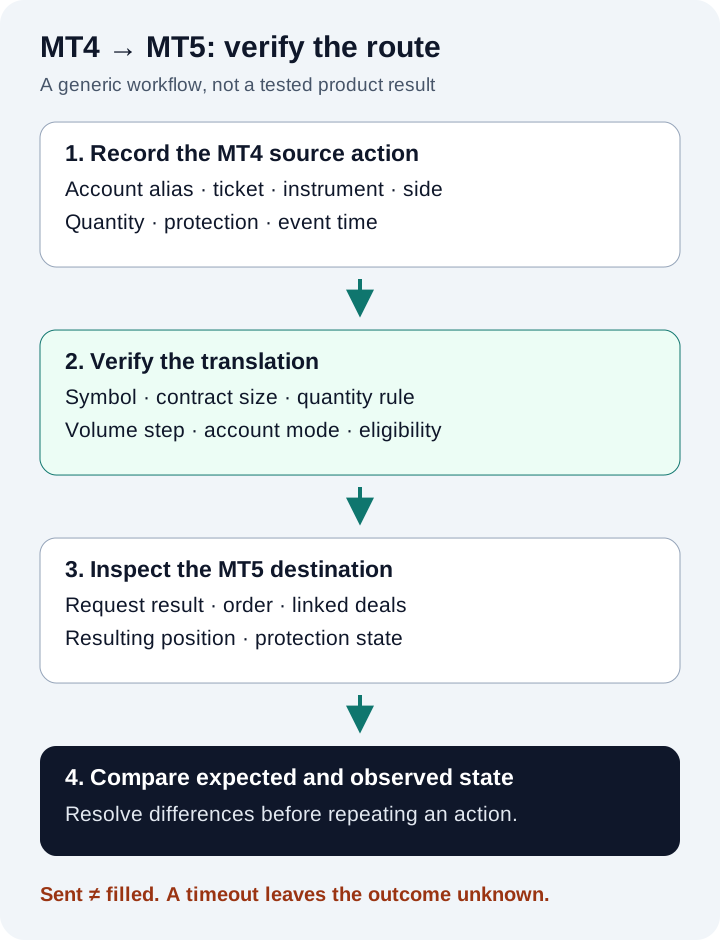
For each worksheet row, record the intended event, expected result, actual result, identifiers, timestamps and a pass, fail, unresolved, unsupported or not-run status. Keep unsupported actions explicit. A broker rejection is not a successful copy; an unresolved response is not proof of either a fill or a failure.
The MQL5 OrderSend reference explains that a successful return does not itself prove execution. Check every linked fill, any remaining working quantity and the resulting position. After a timeout or disconnection, reconcile that state before retrying; repeating an instruction without knowing its outcome can create additional exposure.
If a pending order partially fills before cancellation, successful cancellation of its remainder does not remove the filled position. If a protection update fails, the old protection may remain. Record these outcomes directly instead of marking the complete source action synchronized.
Use the result to decide the next setup step
A useful route record shows what was tested, on which configuration, and which actions remain unsupported or unresolved. It does not certify every market condition or future session. Investigate mismatches at the failing stage: source detection, route eligibility, mapping, sizing, destination request, fill or position association.
For detailed MT5 account and instrument diagnosis, use the MT5 connection-check guide. For plan limits and a small controlled setup, use the Free MT5 guide. Return to this directional record only after the selected provider confirms an MT4-to-MT5 route. If no current connector and supported direction are documented, do not treat this article as an activation guide. Copying automates instructions; it does not supply a profitable strategy or guarantee identical account results.
Revision history and evidence scope
September 24, 2026: reviewed the public self-service flow and MetaQuotes references; route-specific MT4-to-MT5 execution remained unverified. September 25: recorded the owner's confirmation of support for all eight listed platforms. September 26: added signup and support instructions, Free-plan account-count examples and a first-run sequence. October 2: shortened the opening and moved this history here; the fictional sizing exercises and blank test record remain unchanged. Product support and an independently observed account-pair result are separate evidence.
Quick answers
Frequently Asked Questions
Find answers to the most common questions about this topic.
How do I start setting up MT4-to-MT5 copying with TradeCopier?
Create a TradeCopier account and request the current MT4 connection instructions. Provide the MT4 source and MT5 follower broker servers, account modes and intended instruments without passwords or tokens. Confirm the route, map one instrument, calculate its quantity and reconcile a controlled opening and closing test. The Free plan has one group and three total account slots; capacity does not establish route compatibility.
Can I copy trades from MT4 to MT5 automatically?
TradeCopier supports MT4 and MT5, but platform support alone does not verify this MT4-source to MT5-follower route. The inspected self-service menu did not show MT4 setup. Confirm current connection instructions, the broker, account mode and order actions, then reconcile destination orders, fills and positions in a controlled test.
Does TradeCopier currently offer an MT4-to-MT5 route?
The inspected self-service app offered MT5, TradeLocker and cTrader connections, not MT4. This review did not verify a TradeCopier MT4 source to MT5 follower route. TradeCopier supports MT4; obtain current connector documentation and a demonstrated account-pair test from support before relying on one.
Does the built-in MQL5 Signals service copy MT4 signals to MT5?
The official Signals rules restrict MT4 subscribers to signals in the MT4 section and MT5 subscribers to signals in the MT5 section. A separate cross-platform bridge is needed for an MT4-to-MT5 workflow.
Is copying from one MT4 account to another the same setup?
It is a same-platform route, while this guide addresses MT4-to-MT5 translation. Broker symbols, contract sizes and trading permissions still need checking for MT4-to-MT4, but support or test results should not be transferred automatically between routes.
Do I need to install a copier on both terminals or rent a VPS?
TradeCopier supports MT4 and hosts its routing layer for supported connections, but the runtime requirements of this exact MT4-to-MT5 route were not established in this review. Ask for current setup instructions before installing software, keeping a terminal online or renting a VPS; a universal two-terminal setup would be misleading.
Should the MT5 follower use the same lot size as MT4?
Only if that matches the verified sizing policy and instrument specifications. Equal displayed lots can represent different base-unit exposure when contract sizes differ. Check contract size, volume limits, step and the intended sizing rule before submission.
Why can an MT5 follower show fewer positions than MT4?
An MT5 netting account combines same-symbol exposure into one position, whereas a hedging account can retain separate positions. Compare intended exposure and linked executions, not just position counts. Source-specific close and protection changes also need their own route checks.
Does a successful MT4-to-MT5 test prove the reverse direction works?
No. MT5-to-MT4 needs its own supported-route confirmation and tests. Simultaneous copying in both directions also requires explicit handling of copied events to prevent a feedback loop.
What should I do when the copier reports success but the follower differs?
Compare the actual source action, mapping and sizing decision, destination request, every linked fill and final position. A submission response does not establish execution. Keep missing results unresolved and reconcile destination state before retrying.









