Trade Copier Errors and Troubleshooting:
Find the Failure Stage
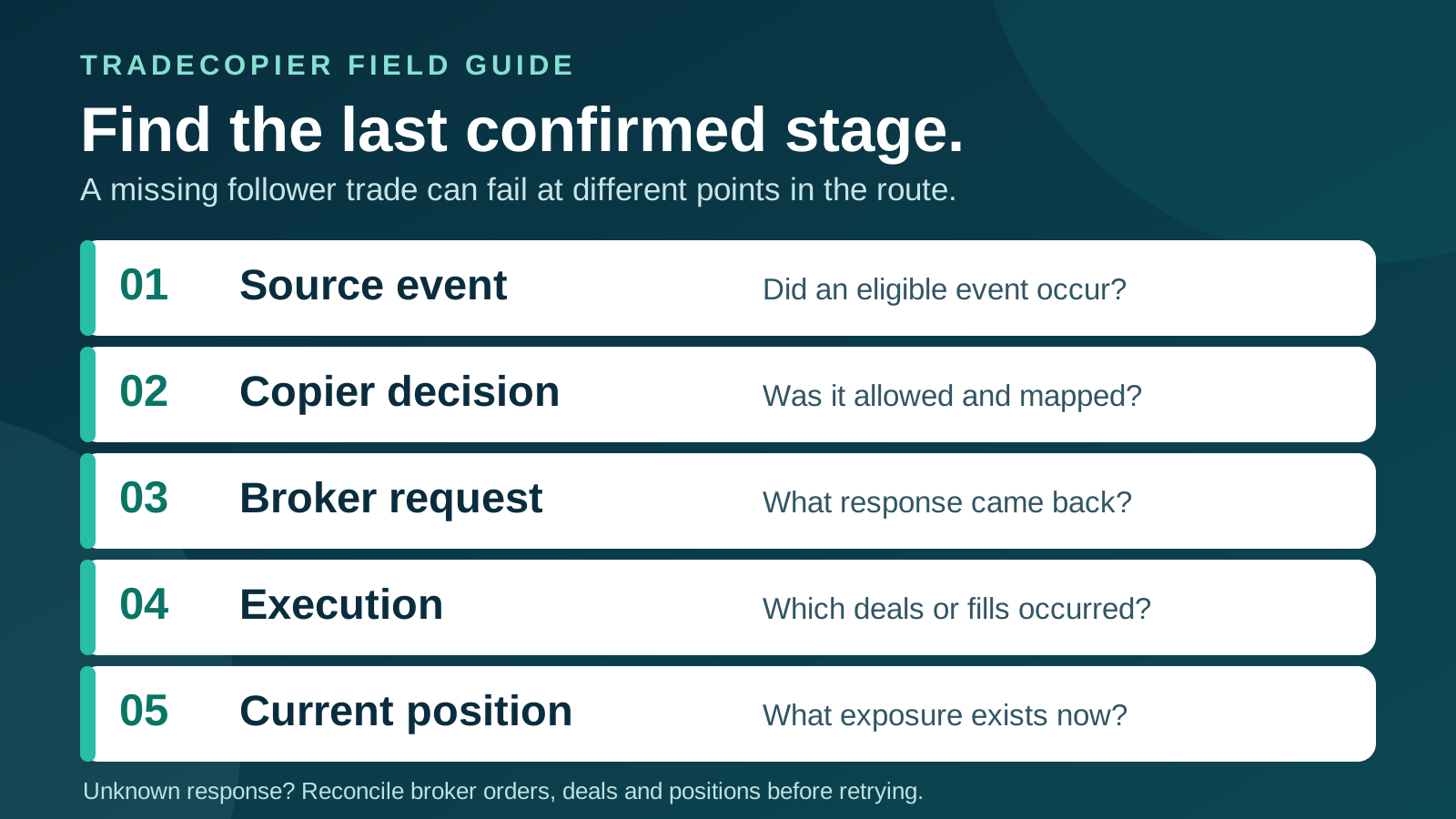
To troubleshoot a missing or incorrect copied trade, find the last confirmed stage: source event, copier decision, destination request, broker execution or current position. A source trade with no follower position can mean very different things at each stage. Do not infer a rejection from a missing acknowledgement, or a fill from an accepted request.
Publisher disclosure: TradeCopier publishes this guide about its own product. The platform references below describe general MT5 and cTrader behavior checked September 23, 2026; they do not prove TradeCopier's connector-specific retry, replay, resizing, duplicate-suppression or alert behavior. Check the exact source-to-follower route and current account records before acting. This article contains no measured error-frequency or performance claims.
Start with the last confirmed stage
For one affected source event and one follower, capture the UTC time, platform, broker/server, account mode, exact instrument, side, quantity and action. Read the copier event and the destination broker's native records. MetaTrader distinguishes an order, an execution deal and a resulting position; one order can produce multiple deals. cTrader likewise distinguishes accepted, filled, partially filled and rejected states. Keep those categories separate.
| Stage | Question | Evidence to check |
|---|---|---|
| Source | Did an eligible event actually occur? | Source order or deal, action, timestamp and account state |
| Copier decision | Was this route connected, enabled and allowed by its saved rules? | Connector status, route, mapping, sizing, filter result and event log |
| Destination request | Was a request sent and what response was received? | Request/correlation ID, native code, message, symbol and requested volume |
| Broker execution | Was any quantity filled, rejected, canceled or left pending? | Broker order and every linked deal or fill, including partial quantity |
| Current exposure | What is open now, including existing positions and pending orders? | Fresh broker-side snapshot in the destination account |
Use the TradeCopier activity-log overview to locate the copier side of the event, then verify the broker side separately. MetaQuotes warns that a successful OrderSend return is not itself proof of execution. A dashboard label such as “sent” or “connected” is therefore insufficient evidence of the final follower position. For a persistent mismatch rather than a single incident, use the separate copier health monitoring guide.
Choose skip, retry, resize or halt from the evidence
The table is an operator decision aid, not a description of automatic TradeCopier controls. “Halt” means hold further action on the affected event or route while the state is resolved; it does not assert that the software pauses itself. Review the native code and current broker state before placing any new request. MT5 trade-server return codes name distinct conditions including placed, completed, partial completion, invalid volume, market closed, insufficient funds and connection errors.
| Observed evidence | Decision to consider | Required check before another request |
|---|---|---|
| Event intentionally excluded by a saved rule | Skip; do not treat it as a failed broker order | Verify the active filter, its follower and the source action. Change the rule only as a separate, reviewed decision. |
| Confirmed invalid login, permission, symbol, stops, funds or closed market | Halt this event; fix the documented cause | Confirm the current account, contract and session. An old market instruction may no longer be appropriate. |
| Confirmed invalid volume | Halt and review sizing; do not silently resize | Compare destination minimum, maximum, step, contract size, margin and intended exposure. |
| Confirmed price change, requote or no quote | Consider a new request only if current intent and route policy permit | Check the latest quote, broker orders/deals, exposure and any retry limit. A retry is a new trading decision. |
| Accepted or placed, no confirmed execution yet | Wait or inspect; do not count a fill | Find the broker order, subsequent deals and updated position before another submission. |
| Partial fill | Reconcile, then decide whether any remainder is still intended | Sum linked deals in the correct quantity unit and check current exposure; do not resend the original full size. |
| Response missing or cannot be matched to an order | Halt: outcome unresolved | Search broker order/deal history and current positions by time and identifiers; escalate if still ambiguous. |
| Possible duplicate event or order | Halt and compare records | Match source event, copier correlation and each broker order/deal; a shared-looking label is not proof of duplicate suppression. |
An explicit platform timeout or rejection code is different from a response that never reached the client. Read the code's exact meaning, then inspect linked executions and current exposure; an expired or canceled order can still have an earlier partial fill. The dedicated partial-fill guide covers fill accounting in more detail. General lost-response and idempotency guidance explains why blindly resending a request can duplicate an action. It does not establish that a particular trade copier offers idempotent retries.
When a connector looks offline, check each layer
“Offline” can refer to an unavailable local component, a lost transport session, failed account authorization or a broker account that is connected but cannot trade. A cloud-hosted route does not prove that every platform-specific connection component is healthy. Record the last confirmed event and compare its UTC time with the first missing event.
- Process and route: identify the exact source, follower and required connection method. Check whether the necessary platform process or connector is running and whether the route is enabled. Do not assume a restarted process replays missed events.
- Authentication and permission: confirm the broker server, account identity and trading permission through the supported setup flow. A successful login does not prove trade permission. Do not paste credentials into a support ticket.
- Transport: compare connector events with network or broker-session errors. Record the native status and timestamps; a “connection” label alone does not identify which side disconnected.
- Instrument and account: check the destination symbol, volume rules, market session, margin and account mode. A healthy connection can still carry a rejected request. The symbol-mapping overview and filter-rule guide cover those two distinct decisions.
- Broker state: after reconnection, inspect pending orders, deals and open positions before deciding whether a source event needs any new action. cTrader's order, deal and reconciliation messages illustrate why current state and event history are separate records.
If an interruption leaves multiple follower accounts uncertain, reconcile each separately. Record which follower is confirmed, which is unresolved and who owns the follow-up. Do not treat a reconnect notification as evidence that missed instructions were replayed or positions now match.
For “market closed,” verify the exact destination session
Start with the destination broker's exact symbol and server, not the source chart or your local clock. MT5 symbol specifications include broker-set trading sessions; cTrader's model includes schedule and holiday information. Product sessions, daily breaks, weekend closures and holidays differ. A market can be open on the source while the follower's instrument is unavailable.
Save the session source, timezone and date checked, then convert the relevant boundary to UTC for the actual event date. Verify daylight-saving, holiday and broker maintenance exceptions instead of shifting yesterday's session by a fixed number of hours. Do not queue or retry a stale trade merely because the next session opens; check the current strategy intent, price, account rules and existing exposure first. For price and freeze-level rejections during news, see the separate news-trading exception guide.
Do not convert an unknown outcome into a second order
Consider a fictional source buy for 1.00 unit at 14:00:00Z. The copier log shows a destination request, then the transport disconnects before a response is recorded. At 14:00:03Z the dashboard has no completion message. That establishes an unknown client-side outcome, not a confirmed rejection. The follower broker might show no order, one pending order, a 0.40 partial fill, a full fill or an unrelated existing position. These invented times and quantities are not TradeCopier measurements.
Search the broker's order and deal history across the event window, match stable IDs when available, and inspect current exposure. If a 0.40 deal is confirmed, determine the remaining intended exposure using the exact instrument and account mode; the original 1.00 request must not be replayed as if nothing happened. If records remain ambiguous, keep the event unresolved and escalate with redacted evidence. cTrader recommends retaining native error codes and descriptions for diagnosis; do not replace them with a generic “failed” label.
Use a blank, redacted incident record
Copy this table for each affected event and follower. Fill unknown fields with UNKNOWN rather than zero or “no trade.” Keep passwords, API tokens, full account identifiers and personal data out of shared reports.
| Field | Your dated evidence |
|---|---|
| UTC event time, timezone source and reviewer | ________ |
| Source and follower aliases, platform, connector version, masked account/server | ________ |
| Source event ID, action, exact symbol, side and requested quantity/unit | ________ |
| Active route, mapping, sizing and relevant filter version | ________ |
| Copier correlation ID, request time and native status/code | ________ |
| Broker order ID, linked deal IDs, fill quantity, pending order and position snapshot | ________ |
| Last confirmed stage; unresolved evidence and sanitized log excerpt | ________ |
| Decision: SKIP, WAIT, REVIEW RETRY, REVIEW RESIZE or HALT; owner and next check | ________ |
These labels record a human assessment; they are not product buttons. “Review resize” means reconsidering intended exposure under the destination contract, not silently changing a rejected order. For a planned route, the separate launch acceptance checklist helps define expected behavior before live use. This troubleshooting record captures what actually occurred after an exception.
Close the incident with broker evidence
Once the source event, copier decision, broker order/deals and final position are reconciled, record the root cause and what changed. Retest only the affected route and actions in an appropriate controlled environment. If the account records conflict, keep the outcome unresolved and contact the relevant product or broker support with the redacted record. No error code, activity-log entry or completed checklist guarantees identical fills, uptime, profitability or account-rule compliance.
Quick answers
Frequently Asked Questions
Find answers to the most common questions about this topic.
Why did my trade copier miss a trade?
Find the last confirmed stage: source event, copier decision, destination request, broker execution and current position. Check route status, active filters, exact destination symbol, trading permission and broker records. A missing follower position alone does not identify the cause.
Can I retry after a trade copier connection timeout?
If the response is missing or cannot be matched to a broker order, the outcome is unresolved. Inspect destination orders, deals and positions before any new request. If an explicit platform timeout code was received, read that code and still check for linked partial fills and current exposure.
Does a successful or accepted order request mean the trade filled?
No. MT5 and cTrader distinguish accepted requests or orders from later execution. Confirm broker deals or fills and the resulting follower position.
Should I resize a rejected copied trade automatically?
No automatic resizing behavior is established by this guide. For invalid volume or insufficient funds, review destination minimum, maximum, step, contract and margin rules. Changing size changes exposure and requires a separate decision under your policy.
What should I check when a trade copier connector is offline?
Identify the affected route and last confirmed event, then check the required process or connector, account authorization, trading permission, transport status, exact instrument and broker-side state. Reconcile each follower after reconnection; do not assume missed events replayed.
Why does a copied trade say market closed when the source chart is open?
The destination broker may have a different symbol, session, daily break or holiday schedule. Check that exact follower instrument and broker server, with the session timezone and date, before considering any later order.
What should I send support for a missing or duplicated order?
Send a redacted incident record with UTC event time, route, masked accounts, source and copier IDs, exact symbol/side/quantity, native status code, linked broker orders and deals, current position and sanitized logs. Never include passwords, tokens or full account identifiers.









